
Booster K1 or T2 for School and University Labs?
K1 fits courses centered on walking, sensors and basic AI; T2 is for manipulation research with both arms. We put size and weight, degrees of freedom, onboard computing and battery side by side from the manufacturer's published specs, and set out how to choose by course goal.
If the course centers on walking, sensors and basic AI, choose K1. If it has to go as far as manipulation research with both arms, choose T2.
The two robots are humanoids from the same company, Booster Robotics, and use the same family of development tools (Booster Studio). What differs is body size, the arms, and the computer inside the robot. The figures below are copied from the manufacturer's published specs (checked 2026-09-26) and the SV Robotics product pages. Prices are in the price tables on the product pages; lead times are not given here.
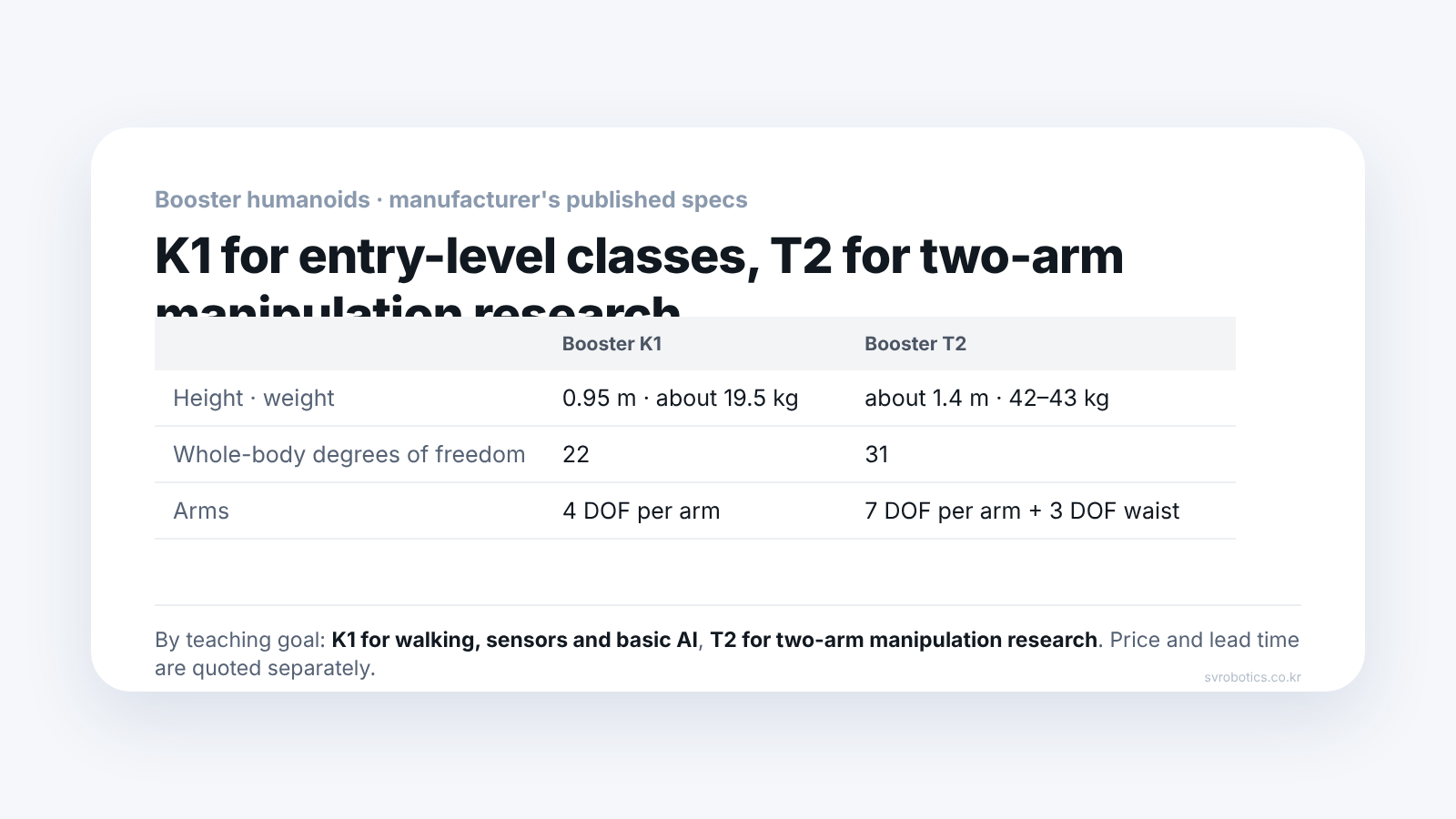
How do the two robots differ?
Size, arms, and the computer inside the robot are different.
| Item | Booster K1 | Booster T2 |
|---|---|---|
| Height | 0.95m | about 1.4m |
| Weight | about 19.5kg | about 42-43kg (depends on configuration) |
| Whole-body degrees of freedom | 22 (legs 6x2, arms 4x2, head 2) | 31 (legs 6x2, arms 7x2, waist 3, head 2) |
| Onboard computing | Geek / Geek Upgrade 48, Education 117, Pro 200 TOPS | Education: ARM processor 375 TOPS (INT8); Pro Gripper and Pro Hand: NVIDIA Jetson Thor T5000 2,070 TFLOPS (FP4) |
| Sensors | Stereo depth camera, 9-axis IMU, microphone array, speaker | Stereo cameras in head and waist, microphone array, speaker; Pro Gripper and Pro Hand include wrist cameras as standard |
| Walking speed | 1.1m/s in published specs | up to 3m/s |
| Battery | 5Ah configuration: about 1 hour 10 minutes at 1.1m/s walking (Geek 2Ah: about 20 minutes) | 48V 10Ah, about 2 hours of continuous walking |
Battery times cannot be compared directly because the measurement conditions differ. For K1 the walking speed is stated; for T2 it is listed only as "continuous walking". TOPS and TFLOPS also differ in unit and calculation precision (INT8, FP4), so the size of the numbers alone does not make a fair comparison.
The weight difference shows up in running a course. Around 20kg and in the 40kg range lead to different plans for moving between classrooms and for storage.
Which courses is K1 suited to?
Walking, sensor and basic AI practice in high schools and undergraduate programs.
The product page summarizes K1's uses this way.
- ROS 2 and Python/C++ practice: lab equipment for high schools and universities where students work directly with walking, sensors and AI
- Introduction to physical AI: a first experience of verifying a policy trained in simulation on a real humanoid
- RoboCup and robot soccer: the official product page presents K1 as the platform of the champion and runner-up teams of 2025 RoboCup Soccer KidSize
K1 comes in four configurations (Geek, Geek Upgrade, Education, Pro). The biggest difference between Education and Pro is onboard AI performance (117 TOPS versus 200 TOPS). According to the product page, if ROS 2, Python, C++ and walking, sensors and basic AI are the core of the course, Education is the balanced choice; if you also plan advanced research that runs large models directly on the robot, Pro is the one.
Which institutions is T2 suited to?
Manipulation research with both arms, data collection and teleoperation, and university and corporate R&D.
The biggest difference in T2 is the arms. It has 7-degree-of-freedom arms and a 3-degree-of-freedom waist, and by the manufacturer's figures it lifts 10kg across both arms combined (varies with posture). There are three configurations.
- Education: high-performance ARM processor, a non-moving model hand
- Pro Gripper: NVIDIA Jetson Thor T5000, two grippers
- Pro Hand: NVIDIA Jetson Thor T5000, five-finger dexterous hand (6 actuated degrees of freedom per hand)
T2 is the next generation after T1, which is no longer on sale.
Can both be taught with the same tools?
Both product pages describe Booster Studio, ROS 2 and the SDK, and a training-and-deployment flow based on Isaac Lab as the development environment.
The product pages describe a flow in which policies and applications verified in simulation are deployed to the real robot. However, in writing this article we could not confirm whether a simulated T2 can be selected in Booster Studio. It is safer to check before adoption. For the tool itself, we wrote up our own hands-on record in Booster Studio: how far can you go without a physical robot?
What should you check before choosing?
- Course audience: for high school and undergraduate practice, K1; if manipulation research is the goal, T2
- Whether you plan to handle objects with arms: if so, consider T2 (configurations 2 and 3)
- Storage and transport space: around 20kg and in the 40kg range need different routes and storage spots
- Student PCs: practicing with a simulated robot needs Docker and free disk space (Docker first, 15GB or more of disk)
- Number of physical robots: the institution decides based on student count and teaching method (Humanoid lab: how to think about student numbers and equipment)
- Price: prices by configuration are in the K1 price table and the T2 price table. Institutional and bulk purchases and lead times are given by quote
Frequently asked questions
What is the difference between K1 Education and Pro?
Onboard AI computing performance. Education is 117 TOPS and Pro is 200 TOPS.
What is the difference between T2 Education and Pro?
The processor and the hands. Education has a high-performance ARM processor (375 TOPS) and a non-moving model hand. Pro has an NVIDIA Jetson Thor T5000 (2,070 TFLOPS) with two grippers (Gripper) or a five-finger dexterous hand (Hand).
I want to buy a T1. Is it still available?
T1 is no longer on sale, and T2 is its successor.
Which one is right for a robot soccer club?
The official product page presents K1 as the platform of the champion and runner-up teams of 2025 RoboCup Soccer KidSize.
How much does it cost?
Prices by configuration are published in the price tables on the K1 and T2 product pages (as of October 2026; may be adjusted if exchange rates change). Institutional and bulk purchases are given by quote, and the curriculum (teaching materials and instructor training) is purchased separately.
This article is based on the official Booster manufacturer specs (K1 and T2, checked 2026-09-26). Prices are in the product page price tables; lead times and course composition are given in a consultation.
Next step
Tell us your course goal, the number of students, and whether you plan arm manipulation, and we will help narrow down which one to look at first. Configurations and quotes are given in a consultation.
Sources: Booster Robotics product documentation spec pages (K1 and T2, docs.booster.tech, checked 2026-09-26) and the SV Robotics Booster K1 and T2 product pages. Figures are the manufacturer's published specs and may vary with configuration and software version.
The copyright of this article and its figures belongs to SV Robotics. Quotation with a link to the original is welcome; full reproduction, redistribution, and reprinting as teaching material require permission.