
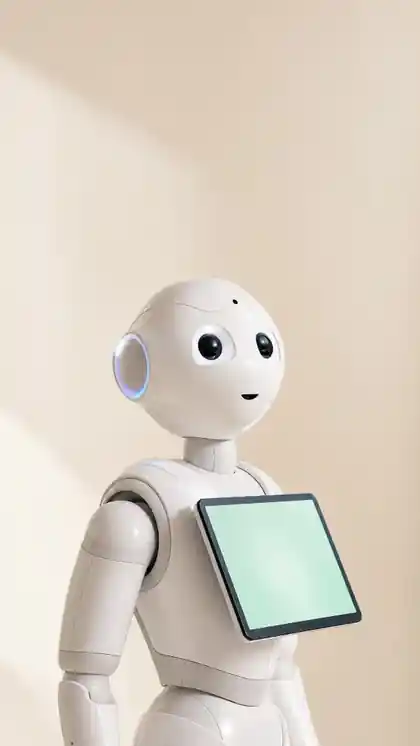
ANSIMROBO · FOR SOFTBANK PEPPER
Your Pepper can do much more.
Install our in-house robot AI software and your Pepper holds AI conversations, guides visitors, speaks six languages and is managed without code. We never touch the hardware.
TRACK RECORD
Pepper is already working in 40+ schools, libraries and public institutions in Korea.
QUICK ANSWER
What is AnsimRobo?
AnsimRobo is a robot AI software brand developed in-house by SV Robotics. Installed on a SoftBank Pepper, it adds AI conversation, facility guidance, six-language responses and no-code management, turning Pepper into a guide, education and service robot.
It is an AI software upgrade that puts the Pepper you already own back to work.
Before you start, tell us your Pepper model, the problems you face and everything you want to improve through Contact us. We will tailor the consultation to your goals.
Where it fits first
Public offices & librariesIn operationService-desk guidance, and walking visitors to the book they are looking for
Schools & educationIn operationAI conversation classes and school introductions
Hospital & hotel lobbiesReception and facility guidance, with answers for international visitors in six languages
Reactivate your PepperYour Pepper gets smarter and goes back to work
WHY ANSIMROBO
Idle or in daily use, your Pepper gets better at its job.
The point is not adding new hardware. It is improving how your existing Pepper interacts and how it is operated, with AI.
No AI conversation
Scripted dialogue expands into generative-AI question answering.
Facility information updates
Edit guidance text, images, URLs and location information from the admin screen.
Staffing to operate it
Basic settings and content changes are possible without an engineer.
Idle equipment
The Pepper you already own is upgraded into an AI guide robot.
CAPABILITIES
One Pepper experience: talk, guide, manage.
Natural interaction for visitors, an editable admin environment for operators.
AI Conversation
Context-aware Q&A and natural conversation.
Facility Guide
Combines voice, motion and tablet images to guide visitors to places and information.
No-Code Admin
Edit the robot's name, buttons, URLs and guidance images on site.
6 Languages
Speaks and understands English, Korean, Chinese, Japanese, Spanish and German. Pick the language in the settings on Pepper's tablet and it switches right away.
HOW TO START
From first message to live operation in five steps.
- 01
Compatibility check
We check your Pepper model, software version and network remotely
- 02
Remote installation
Installed automatically from your PC over Wi-Fi, within 10 minutes
- 03
Institution setup
Add place names, guidance text and images
- 04
AI & language setup
Choose which of the six languages to use
- 05
Live operation
Changes made on the admin screen reach the robot instantly (app v2.1 or later)
You can always go back. Only the AnsimRobo app is installed and removed, so every other app on your Pepper stays as it was, and no extra hardware is attached.
REMOTE INSTALL
Installed from your PC over Wi-Fi, within 10 minutes.
The installer on your PC installs it automatically on the Pepper over Wi-Fi. When installation finishes, ask Pepper a question and listen to its answer.
REAL INTERFACE
Operators edit content on the real screen.
Representative admin screens.
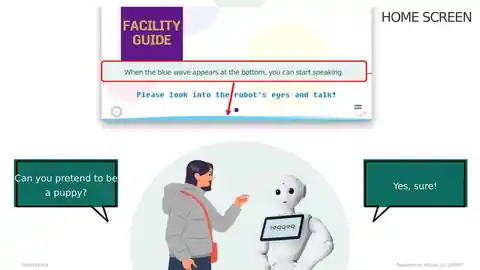
Conversational AI
Check the AI response mode and the conversational service setup.
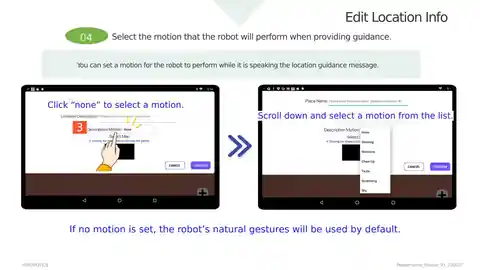
Facility guide
Connect place names, guidance text, images and motions.
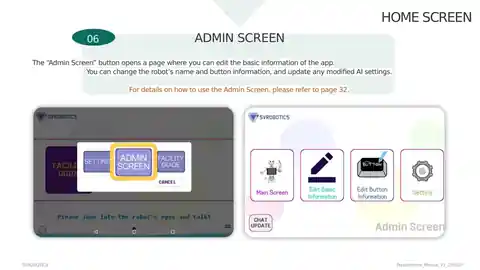
Admin dashboard
Edit buttons, URLs and information directly on site.
BEFORE YOU ASK
What helps us when you get in touch
Share these four things and we will first check whether your Pepper can be upgraded. Leave out anything you do not know.
Model
The model and number of Peppers you own.
Current state
Whether it is in use or in storage, and what software it runs.
Site
Where the robot will stand and the network there.
Purpose
What you want Pepper to do: guidance, education, events.
QUESTIONS & ANSWERS
Questions before you adopt
Does my Pepper need any hardware changes?
No. The AnsimRobo app installs as software, and you can remove it to return Pepper to its original state.
What can it do?
AI conversation, facility and amenity guidance, answers in six languages (English as the default), and button, URL and image changes from a no-code admin screen.
Do we need a developer on site?
No. Day-to-day operation runs from a no-code admin screen. Changes you make there reach the robot instantly (app v2.1 or later).
How does adoption work?
Five steps: 1) compatibility check, 2) remote installation, 3) institution setup, 4) AI and language setup, 5) live operation. The compatibility check — Pepper model, software version and site network — is done remotely, so no site visit is needed.
How is it installed?
The installer on your PC installs it automatically on the Pepper over Wi-Fi. Automatic installation takes within 10 minutes, and everything from connection setup to confirming the first conversation takes within 30 minutes. You finish by asking Pepper a question and listening to its answer.
Can we go back to the original setup?
Yes. Only the AnsimRobo app is installed and removed, so every other app on your Pepper stays as it was. No extra hardware is attached.
Can a Pepper that has been sitting in storage be upgraded?
Yes. It does not matter if your Pepper has been in storage or only runs a fixed script. Tell us the model, its current condition and where it will be installed, and we first confirm whether the upgrade is possible.
What can administrators change themselves?
The robot's name, buttons, URLs and guidance images, directly from the admin screen. Facility guidance combines place names, guidance text, images and motions.
Where does it work well?
Public service desks and libraries (desk guidance, finding materials), schools and educational institutions (AI conversation classes, school introductions), hospital and hotel lobbies (reception, facility guidance, answers for international visitors), and anywhere you want an idle Pepper back on the floor. Pepper is in operation at 40+ schools, libraries and public institutions in Korea.
How much does it cost?
AnsimRobo AI Service SaaS costs USD 150 per month (monthly subscription, excluding taxes). Installation is done remotely. If you want on-site installation instead of remote installation, travel costs are charged separately.
Which languages does it support?
Six: English, Korean, Chinese, Japanese, Spanish and German, with English as the default. Choose the language in the settings on Pepper's tablet and it switches right away.
FOR EXISTING PEPPER OWNERS
Already own a Pepper? Start from where it is today.
It does not matter if your Pepper has been in storage or only runs a fixed script. Tell us the model, its current condition and where it will be installed, and we first confirm whether the upgrade is possible.
Compatibility check
We check your Pepper model, software version and site network remotely. No site visit.
Software installation
Installed without hardware changes, and removable to return to the original state.
Decide in consultation
In the consultation we confirm how far AI conversation and the admin screen apply, and decide together.
CONSULTATION
Find out first whether your Pepper can work again.
Tell us the model, current condition, site and purpose, and we will review compatibility and scope.
Contact usSV ROBOTICS · CONTACT
Talk to us about AnsimRobo for SoftBank Pepper.
Tell us your Pepper model, its current condition, the site and what you want it to do. Our team will reply by email.
Contact us
Prefer email? Write to innorobo@naver.com.