
When Should You Start Teaching ROS 2?
Surprisingly, reinforcement learning practice does not use it. When we opened the actual deployment code, it was clear when it first appears.
When you plan a curriculum, this ordering question comes up.
"When do I teach ROS 2?"
Since robots mean ROS, many people put it at the very front. But for reinforcement learning practice, you can push it back quite a bit.
We found this out by opening the actual deployment code.
Is ROS 2 used even in the training stage?
We opened two pieces of code that Booster published.
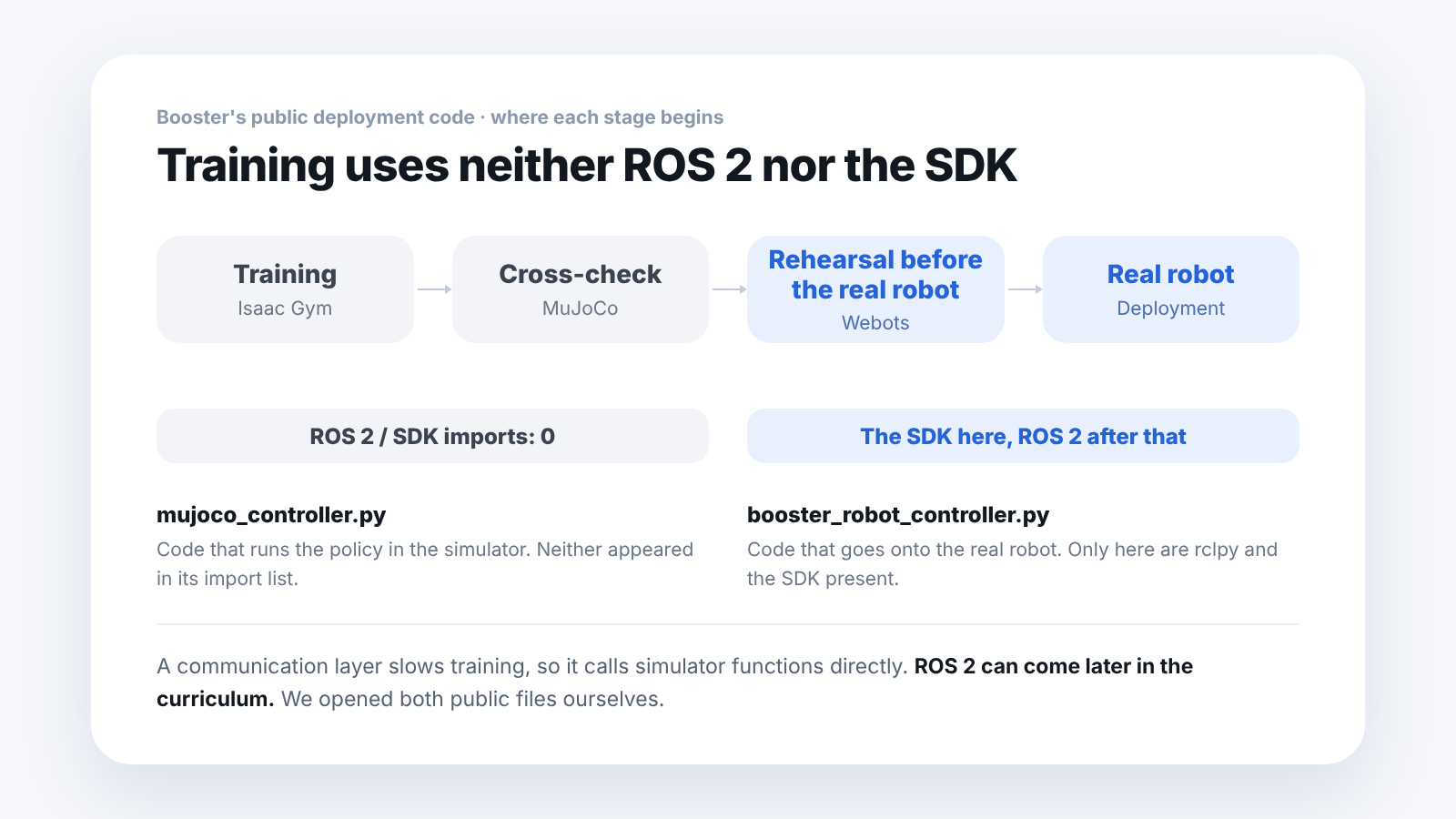
mujoco_controller.py: the code that runs the policy in the simulator. It had no line importing ROS 2 or the SDK at all.
booster_robot_controller.py: the code that goes onto the real robot. Only here were rclpy and the SDK present.
There is a reason. Putting in a communication layer slows down training.
Training runs thousands of robots at once inside the simulator. Adding a layer that sends and receives messages in between becomes a bottleneck. So it works by calling simulator functions directly.
When do ROS 2 and the SDK appear?
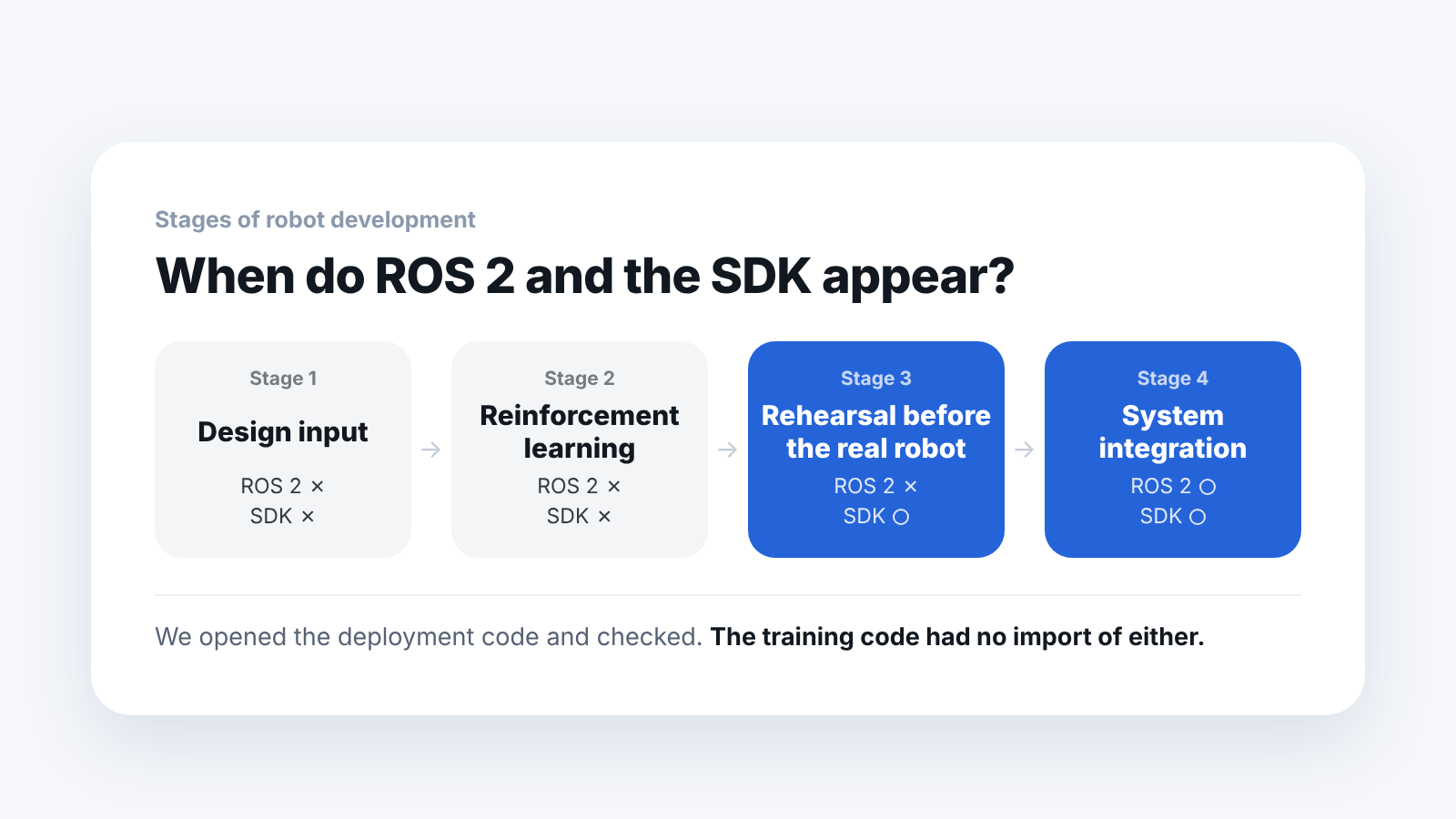
The SDK appears from the moment you first write code to send to the real robot.
In Booster's development flow, this is the Webots stage. It is effectively the rehearsal just before the real robot. Code that runs here goes to the real robot as it is.
ROS 2 comes after that. You need it when you connect several programs, such as camera, driving and recognition, into one system.
How do you place it in the curriculum?
Arranging it like this means students get less lost.
- First part: design files, simulators, reinforcement learning (without ROS 2)
- Middle part: putting trained results onto the real robot with the SDK
- Later part: connecting several programs with ROS 2
If you put ROS 2 at the very front, students start by learning for several weeks something that reinforcement learning does not use.
Laid out by stage as confirmed in the deployment code, it looks like this.
| Stage | What you do | ROS 2 | SDK |
|---|---|---|---|
| Training (Isaac Gym, MuJoCo) | Train the policy in the simulator | None | None |
| Cross-check (MuJoCo) | Check again in a different physics engine | None | None |
| Rehearsal before the real robot (Webots) | Write code to send to the real robot | None | Appears |
| Deployment (real robot) | Connect camera, driving and recognition programs | Appears | Used |
What does the SDK do for you?
To send a command to the robot, you would originally have to do this.
- Fill in the command to match a set data format
- Calculate and attach a verification number called a CRC (Cyclic Redundancy Check)
- Send it out over the communication line
The SDK does this for you. Students only have to call one function.
Here is an analogy with mailing a letter. Instead of putting it in an envelope, writing the address, sticking on a stamp and going to the post office, you call a courier. What arrives is the same, but it decides whether you can do it on the first day.
How many message definitions are there?
Once you start using ROS 2, you meet something called message definitions. They are the formats of the data exchanged with the robot.
We counted them on the Booster side. There are 8.
Booster hides the communication procedure behind SDK functions. This is a structure where students can start right away without learning each message format from the beginning.
Translated into a curriculum, a natural order is to get results first with SDK functions in the early stages, and then open the message definitions one by one once you get to the ROS 2 stage.
The message definitions can be counted straight from the public repository, so before you finalize the curriculum, we recommend checking where the signals needed for your research topic come from.
Frequently asked questions
Can I skip teaching ROS 2 altogether?
No. It is definitely needed at the stage of connecting several programs. The point is to push it later in the order.
Can't I use ROS 2 in the training stage?
There is nothing stopping you, but it gets slower. Training time increases by that much.
What language is the SDK in?
The Booster SDK we checked provides a Python interface.
What code did you check?
Two pieces of deployment code that Booster published. We opened mujoco_controller.py and booster_robot_controller.py ourselves and checked the import lists.
Next step
These are good to read next.
- Will a Trained Robot AI Walk If You Just Load It?: covers the four things that must match when you load it onto the real robot.
- What Should You Prepare First for a Humanoid Robot Course in Its First Semester?: an example of the order in which to prepare a one-semester course.
- Which Robot Simulator Should a Robotics Lab Install?: the criteria for choosing the simulator used in the early stages.
What is described here is what we confirmed by opening the public deployment code ourselves. Other manufacturers may be structured differently.