
It Walks in the Simulator but Wobbles on the Real Robot
One number inside a file may be the cause. It is called armature. We opened Booster's public files and checked.

In the simulator it walks without trouble. Put it on the real robot and it wobbles.
This is the most common situation in reinforcement learning practice. People run the training for a few more days, thinking it needs more.
But the cause may not be the training. It may be one number in a file.
What is armature?
Inside a motor, a piece of iron spins. It is called the rotor.
That iron has weight too, so it resists when you try to spin it up suddenly. It resists when you try to stop it as well. Armature is the number that records how much it resists.
You have felt this in daily life. You switch off a fan and the blades keep turning for a while. That is rotational inertia.
A robot joint works the same way. The moment the motor turns, this resistance appears.
What happens when the value is missing?
The simulator calculates the robot as lighter than it really is.
When you give a command, the joint responds faster than the real one, and when you tell it to stop, it stops sooner. An AI trained in there comes out tuned to that lighter robot.
The real robot is not like that. It does not follow the command exactly, and when told to stop it travels a little further.
That is why something that walked in the simulator wobbles on the real robot.
Are the values filled in the real MJCF files?
We opened the MJCF files that Booster publishes and counted. MJCF is the file format that the MuJoCo simulator reads.
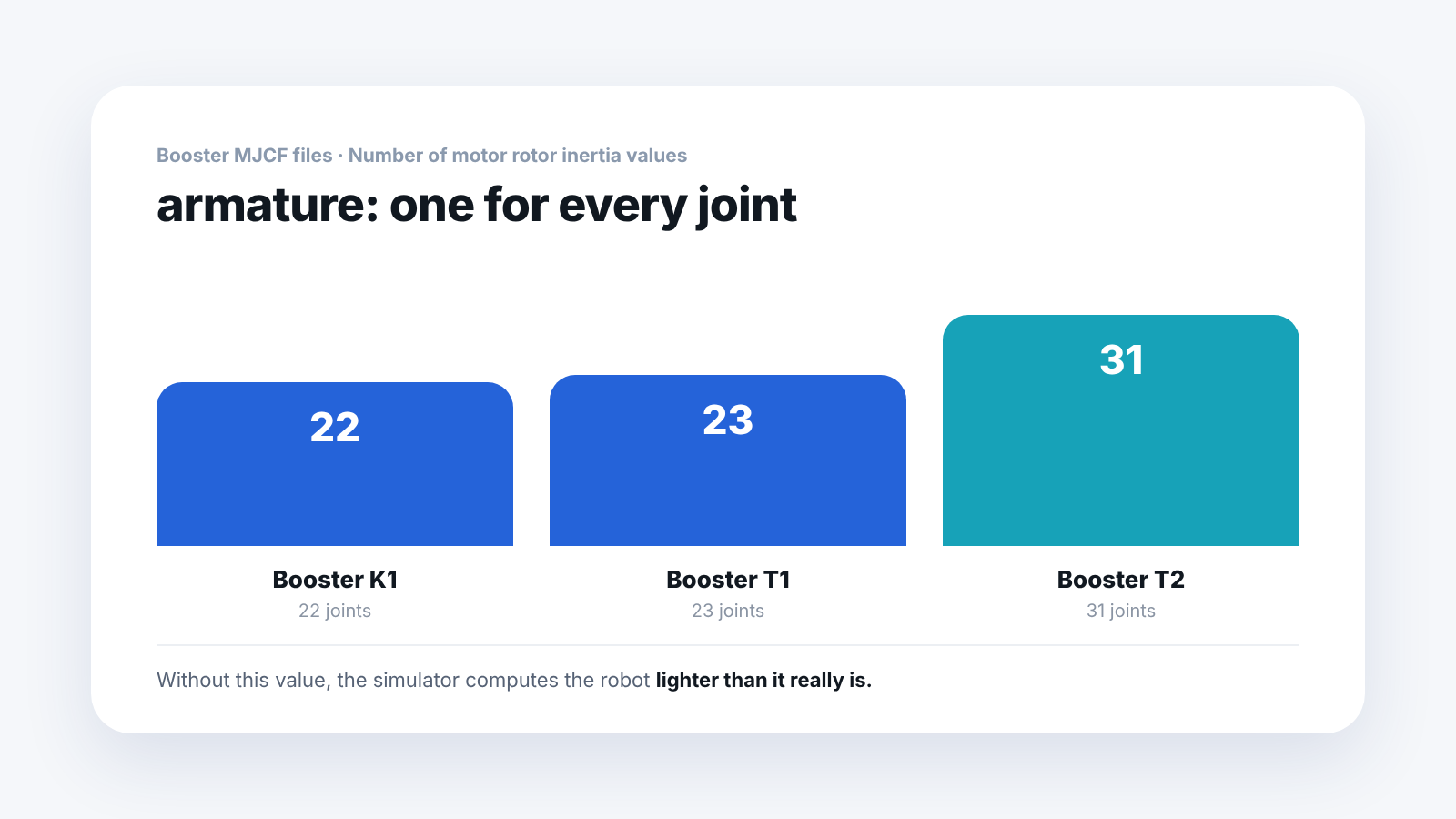
In Booster's files, there was a value for every joint. That is 22 for K1, 23 for T1 and 31 for T2.
If you train with a file that has no values, you get the "lighter robot" problem described above, so this is a number worth checking before practice.
Why is the value missing from the URDF?
There are two kinds of description file.
- URDF — the skeleton, joints, weights and torque limits. Most tools read it
- MJCF — holds values that the URDF format has no field for
The URDF format has no place for armature. So it only goes into the MJCF.
The interesting part is that the file is useful even if you do not use MuJoCo. You can read the values and copy them into your Isaac Sim settings. An MJCF is a simulator file, and it is also a physical specification sheet.
How do you check this in a lab?
Open the file and search for armature. If there is one per joint, it is filled in. If there are none, it is empty.
It also works as an exercise where students check how closely the simulator resembles the real robot. They see for themselves how one number changes the result, and it tends to stay in memory.
While you have the file open, a few more things are worth a look.
Sensor definitions are in the MJCF too. Here is what we counted.
- Booster K1 — orientation values, gyroscope
- Booster T2 — orientation values, gyroscope, velocimeter, position
T2 has more kinds. A velocimeter is useful for walking control.
One more thing. Friction loss and damping were 0 in all three files.
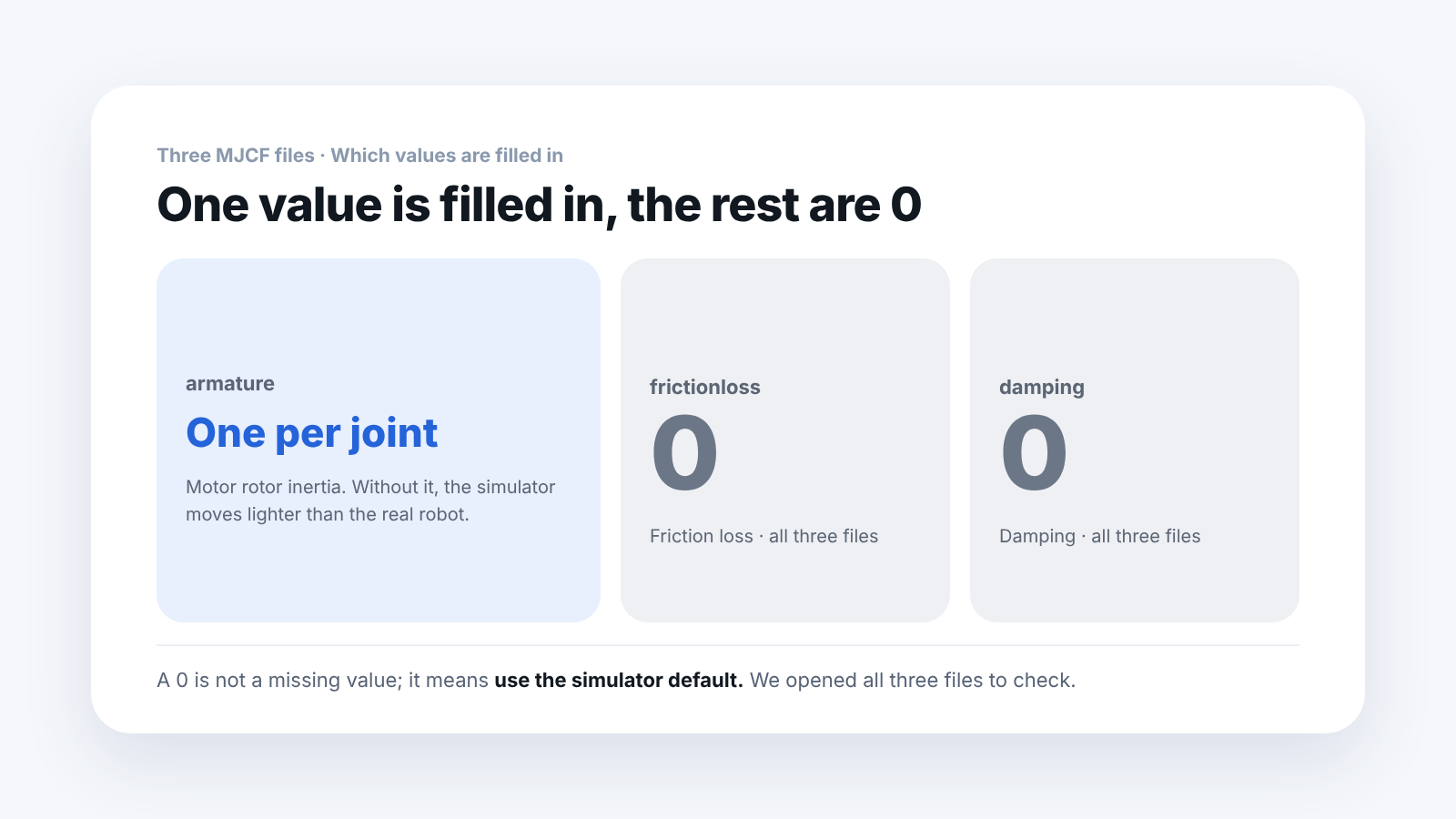 Only armature is filled in and the rest are empty, which means the simulator defaults are used.
Frequently asked questions
Does training fail without armature?
No. The robot walks fine inside the simulator. The problem appears when you put that result on the real robot.
Can I enter the values myself?
You can. But you need the motor specifications, so a file that the manufacturer filled in is more accurate.
Do I have to use MuJoCo?
No. Isaac Sim alone covers everything from training to deployment. The MJCF is also used to check the values.
Which files did you check?
Three MJCF files: Booster K1 22DOF, T1 23DOF and T2 31DOF. Other files from the same company may be set up differently.
Next step
These are good to read next.
- I Got the URDF but It Has No Motor Gains — another value that is missing because the URDF has no field for it, checked in the same three files.
- Will a Trained Robot AI Walk If You Just Load It? — what else you need when you load a trained walking AI onto the robot.
- A Walk Learned in Isaac Lab: Does It Also Walk in MuJoCo? — what happened when we moved to a different physics engine and checked whether the walk held.
The numbers here are values we counted by opening the public MJCF files ourselves. The files checked are three: Booster K1, T1 and T2. This is not an experiment comparing how much the real robot wobbles with and without the values.