
Does Six-Humanoid Soccer Really Run Without a Robot?
It does. We did not change a single line of code, and when we stepped away for a moment, the score had reached 2 points. Even the referee actually works.
We did not buy a single physical robot and worked only on a PC. This is a record of installing Booster Studio 1.11.4 on Windows 11 and launching the 3v3 Soccer match scene.
Does a soccer simulation really run without a robot?
It runs. Simulated robots and simulation scenes are built in, so everything runs without a physical robot. The test in this post was also done from start to finish without a robot.
Choose 3v3 Soccer match when you create the project and run it. On the first run, though, it downloads about 12GB of Docker images and takes around 7 minutes. We wrote up the size and time separately.
Maximize the simulator window and the rendering quality shows properly. Even the turf grain, the advertising boards and the floodlight towers are implemented.
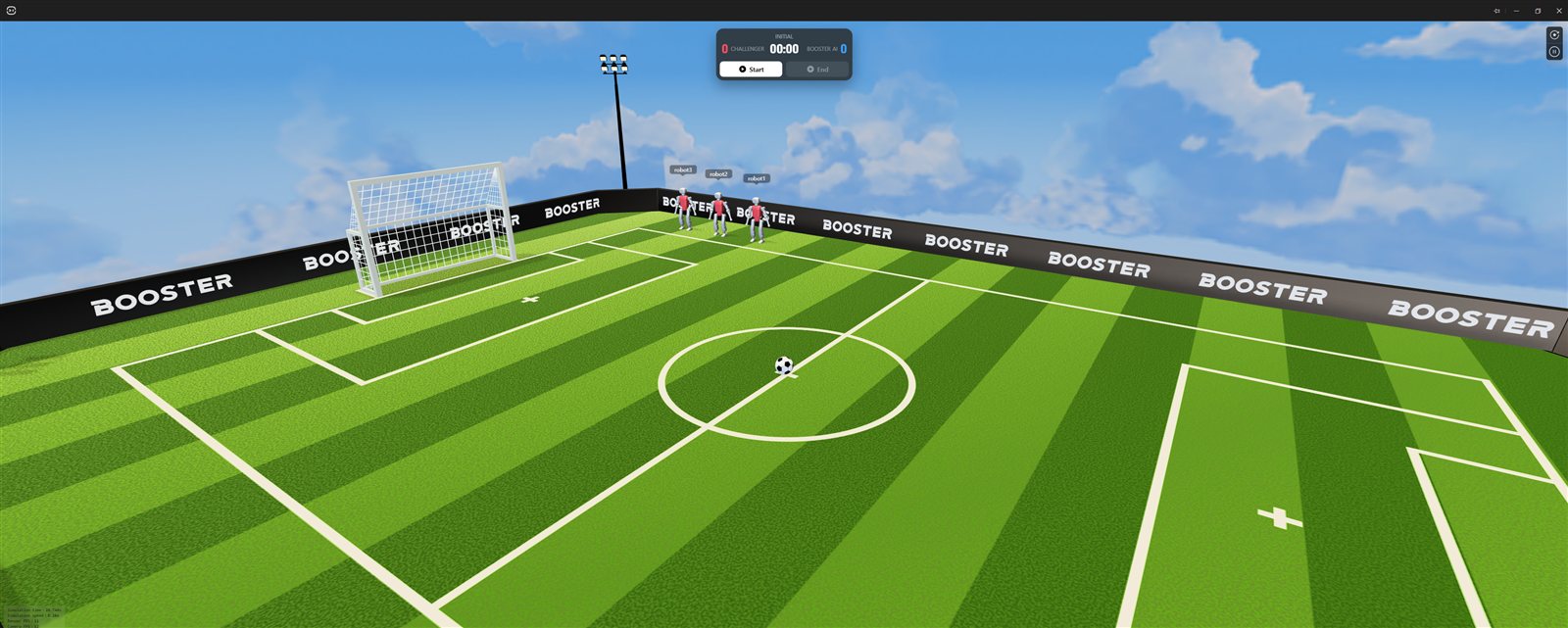
- ① Scoreboard —
INITIALstate,CHALLENGER 000:00BOOSTER AI 0, withStartandEndbuttons below - ② Three red-uniform robots — name tags
robot1robot2robot3above their heads - ③ Soccer ball — in the middle of the center circle
- ④ Goal — a
BOOSTERadvertising board and floodlight towers are visible behind it
What do you see when the match starts?
When you press Start on the scoreboard, the six robots each walk to their legal positions. Three on the red team and three on the blue team.
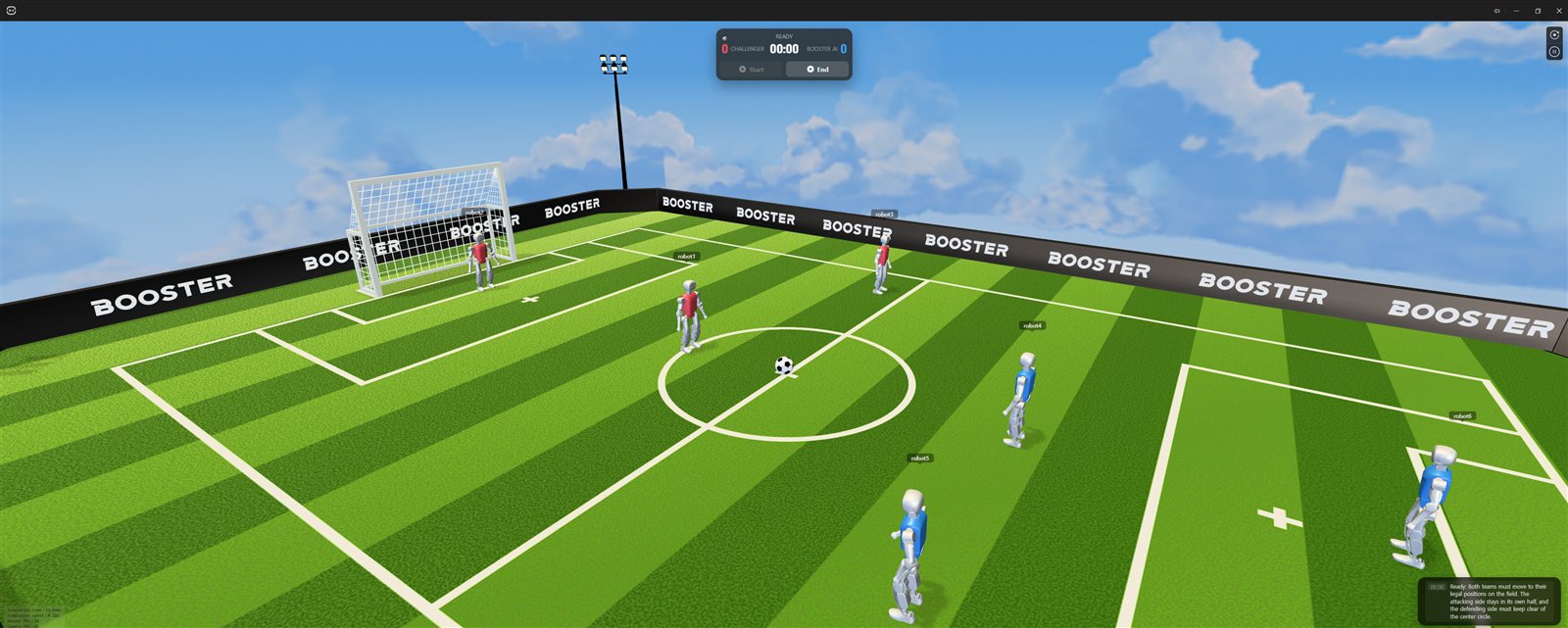
- ① Scoreboard —
READYstate,00:00.Startis dimmed andEndis bright - ②
robot1— red uniform (red team) - ③
robot4— blue uniform (blue team) - ④ Announcement log — a sentence beginning "Ready: Both teams must move to their legal positions on the field."
The match time and score stay on the scoreboard at the top of the screen. The robots are told apart by red-team and blue-team uniforms, and when one falls it gets back up on its own and takes position again.
The walking is not as smooth as a person's. As real humanoid walking is, they sway side to side while shifting their center of gravity. Because the physics engine is CPU-based MuJoCo, this one scene pushes the CPU up to the high 90s percent.
Does the referee work too?
It does. The GameController actually judges corner kicks and goals, and a log is posted in real time during the match.
Restart Setup: Placing ball for corner kick.
Ball placement: walking the ball to the restart spot.
Ball placement complete: ready for the restart.
Corner Kick: Challenger takes the corner.
Goal: Challenger scores.
The flow of repositioning the ball, awarding a corner kick and recognizing a goal is all there. Look closely at the log and it even shows that the referee "walks" the ball to the repositioning spot. For a team preparing for RoboCup rules, this is the most useful part.
Does it score goals without changing the code?
It does. We left it running, did something else for a while, and came back to find 2 points on the board. It was the soccer_sim template with not a single line changed.
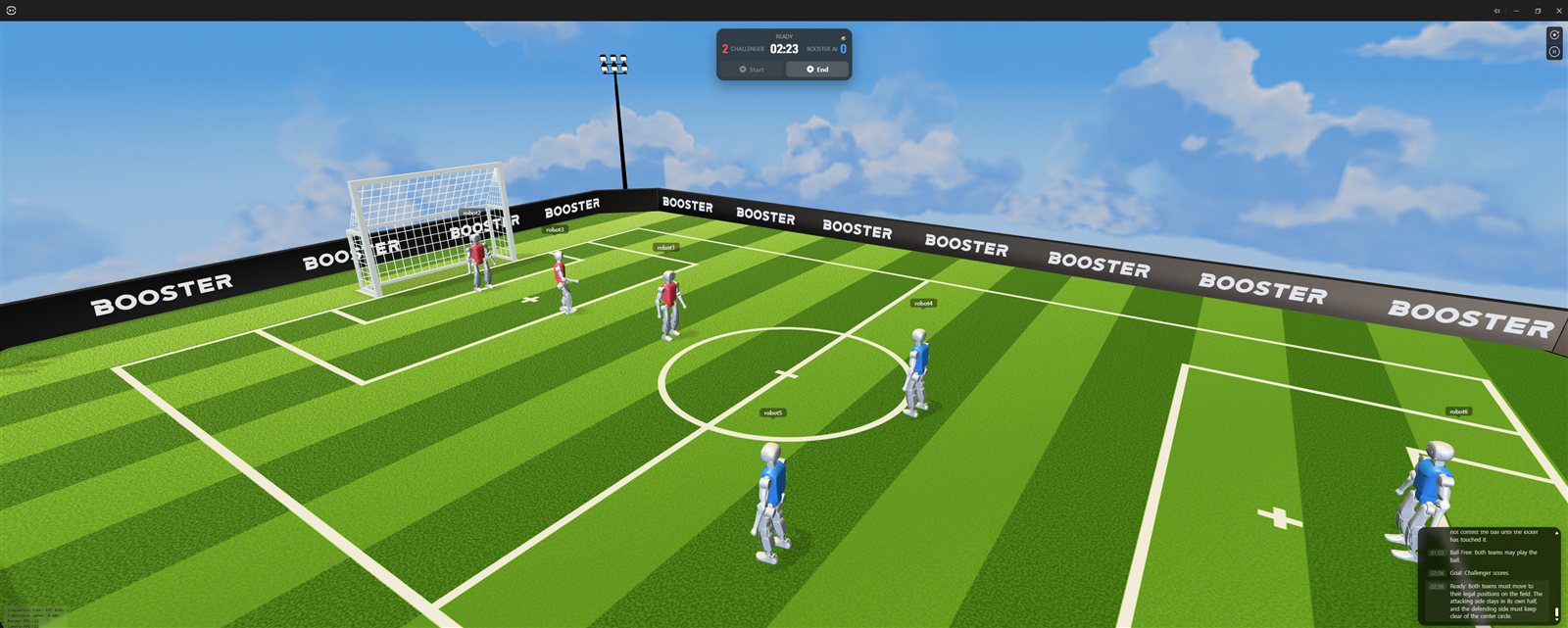
- ① Scoreboard —
CHALLENGER 202:23BOOSTER AI 0 - ② Match log — stacked in the order
01:03 Ball Free,02:06 Goal: Challenger scores.,02:06 Ready
This is because the default template already includes a state machine, path planning and obstacle avoidance. The agent control loop keeps printing in the IDE Output panel, and since it shows dt=0.050, the control cycle is 20Hz.
Should you start with 3v3 from the beginning?
We do not recommend it. The screen is flashy, but there are two conditions that work against learning.
- It is heavy — on a Ryzen 5 5600X · 16GB RAM · RTX 2060 it ran at an average of 0.50x real time
- The control panels are locked — with six robots it is set to multi-robot mode, and the motion and head control panels are all disabled
If your goal is competition preparation, it is a different story. An environment where you can see the referee decisions and the strategy code on one screen together is rare.
Unless you are measuring the performance limit or preparing for a competition, making a single robot walk yourself in the Default scene leaves you with much more.
Frequently asked questions
Do I need a physical robot to run 3v3 soccer?
No. Simulated robots are built in, so everything runs on a PC alone.
How much of the match rules are implemented?
In the range we checked, corner kicks, ball repositioning and goal decisions were confirmed in the log. We did not verify the full rules.
Can I change the robots' strategy myself?
Yes. The soccer_sim template comes as a Python package, so you can edit the state machine and path planning.
Is 0.5x speed a problem for training?
It means one second in the simulation is two seconds in reality, and that multiplies directly into reinforcement learning time. If your purpose is to collect data, increase the number of CPU cores first.
Next steps
These posts are good to read after this one.
- Can You Use the Robot-View Camera and Joystick Inside the IDE? — How to use the control panels in a one-robot scene.
- 3v3 Simulation Speed Can Differ by Two Times Depending on Conditions — The result of measuring how heavy this scene is with 400 samples.
- How Do You Create Your First Project in Booster Studio? — Explains which of the three scenes to choose first.
What is described here is what we confirmed by installing and running Booster Studio 1.11.4 ourselves on Windows 11 Pro build 26100.