
3v3 Simulation Speed Can Double Depending on Conditions
Closing only the browser took 0.38x speed to 0.50x. These are the results of measuring 400 samples.
We ran a soccer simulation with six robots in Booster Studio.
If we had measured only once, we would have made a mistake. The speed differed by more than double depending on the conditions.
We collected 400 samples at 25-second intervals and summarized them.
How much does simulation speed change with run conditions?
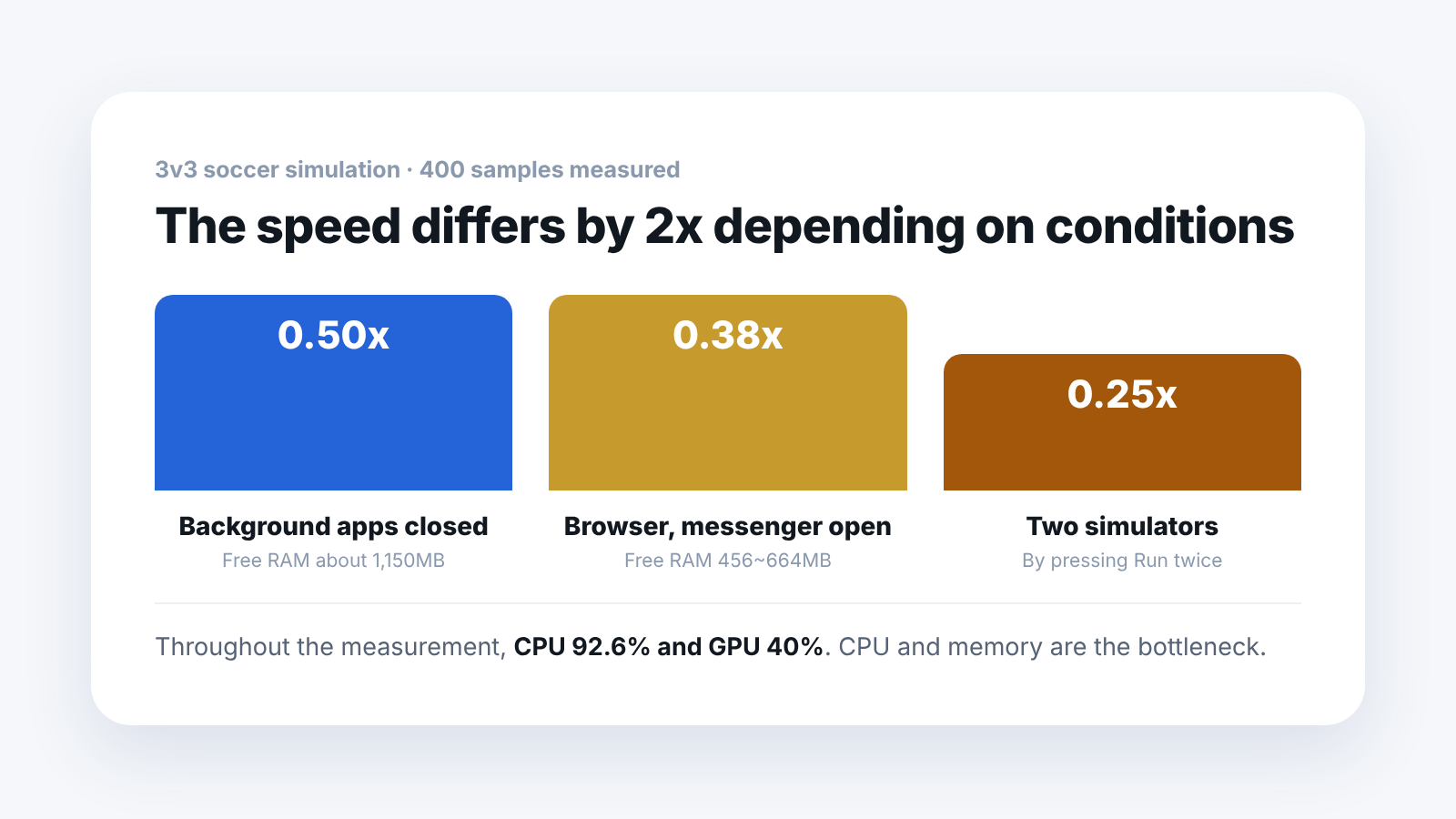
- After closing background apps — 0.43 to 0.60x (average 0.50), 22 to 32 FPS on screen
- With the browser and messenger left open — 0.38x, 16 FPS on screen
- Two simulators overlapping (by mistake) — 0.22 to 0.30x, 10 to 17 FPS on screen
All three conditions are results from the same 3v3 scene on the same PC. We left the specifications as they were and changed only the surroundings.
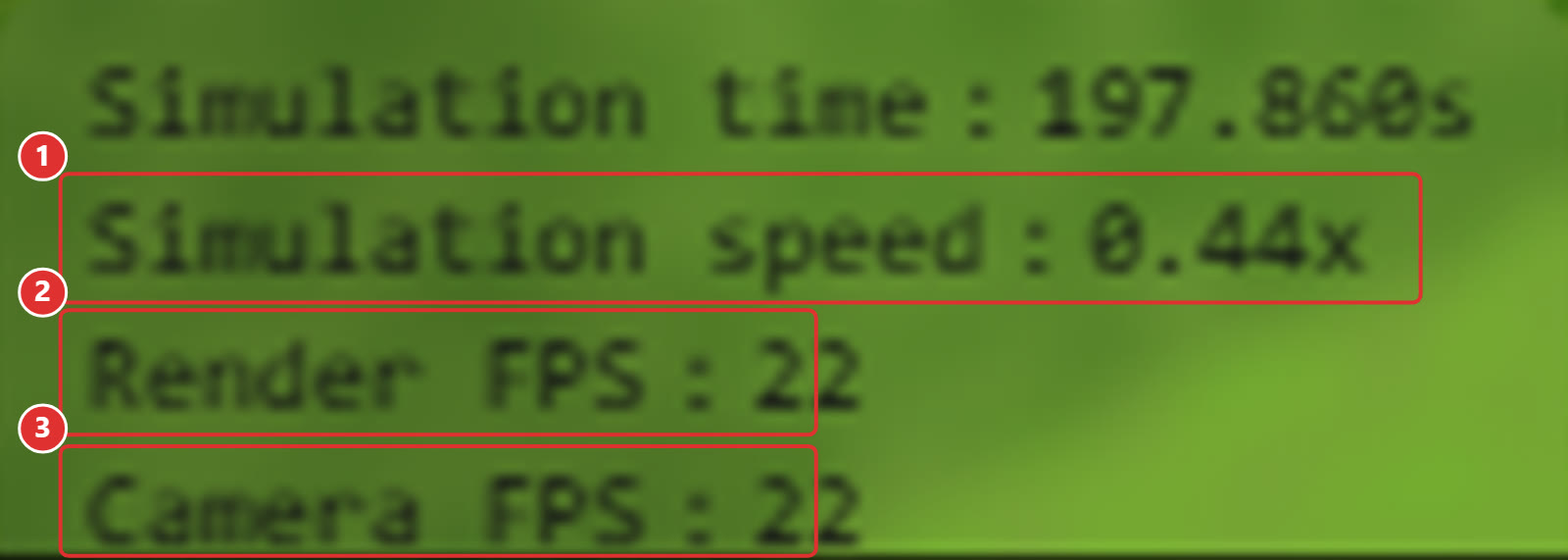
- ①
Simulation speed : 0.44x— simulation speed - ②
Render FPS : 22— frames per second for drawing the screen - ③
Camera FPS : 22— frames per second for the camera
Just closing the browser and messenger made it more than 30% faster.
For reference, 0.50x means one second in the simulation takes two seconds in real life. If you are collecting reinforcement learning data, this speed multiplies directly into training time. It is not a number to skip over.
Why does closing background apps make it faster?
CPU usage went from 98% to 93%, almost unchanged. Yet the speed went up.
Looking at free RAM gave the answer.
- With the browser left open — free RAM 456 to 664 MB
- After cleanup — free RAM about 1,150 MB
It becomes clearer when you look separately at the 177 samples, out of 400, where the studio was actually running. In that stretch, free RAM averaged 598MB and fell as low as 46MB. 167 samples, 94% of them, were below 1GB. Memory was tight almost the whole time.
The bottleneck was not only the amount of CPU computation. It was also limited by free memory.
How much does the graphics card get used?
Throughout the measurement it looked like this.
- CPU — 92.6%
- GPU — 40%
We counted again over the same 177-sample stretch.
- CPU — average 78.9%, maximum 100%. 78 samples (44%) exceeded 90%
- GPU — average 35.5%, maximum 66.4%. Only 14 of 177 samples (8%) exceeded 50%
The CPU sat in the 90s for nearly half the time, while the GPU was used even half as much in fewer than one sample in ten.
The physics engine is MuJoCo, which does its computation on the CPU. So no matter how far you upgrade the graphics card, it will not get faster.
"A better graphics card will fix it" is the wrong answer. Look at the CPU core count first.
What happens if I press the Run button several times?
If you press Run several times, the earlier simulator containers do not close and pile up.
It is hard to notice by eye, because only one simulator window shows on screen. We also ran two at once without knowing, the speed fell to 0.22x, and finding the cause took a long time. If the speed suddenly halves, this is almost certainly it. If it feels slow, check in the terminal.
docker psYou can clean up unused containers with docker stop.
How much CPU does one simulator use?
We looked at the container on its own.
CONTAINER  virtual-robot
CPU        717%   (about 7.2 of 12 threads)
MEM        3.56 GiB / 7.71 GiB
GPU        38 ~ 46 %
It uses 7 of 12 threads by itself. On a 6-core PC, that leaves almost no headroom. It also uses 3.56GiB of memory alone, close to half of the 7.71GiB allocated to the container.
You can guess what happens when one more container joins. That is why we dropped to 0.22x.
This number is why we recommend 8 cores or more.
This is the environment in which we measured these numbers.
CPU : AMD Ryzen 5 5600X (6 cores, 12 threads)
RAM : 16 GB
GPU : NVIDIA RTX 2060
OS  : Windows 11 Pro
App : Booster Studio 1.11.4
This PC falls short of the recommended specification (8 cores, 32GB). Results will change if you raise the specification, so treat these as a reference.
Frequently asked questions
Does an 8-core, 32GB machine reach real-time speed?
We did not measure that specification, so we cannot say for certain. But since the bottleneck was CPU and memory, there is considerable room for improvement.
Does reducing the number of robots make it faster?
Yes. The default scene with a single robot is much lighter.
How did you collect the 400 samples?
We recorded CPU, GPU and free RAM at 25-second intervals. For each condition we took five readings and averaged them.
If the GPU is at 40%, is a lower-spec GPU fine?
There is headroom for drawing the screen. But if you do large-scale training with Isaac Sim, the GPU becomes important then.
Next steps
These posts are good to read after this one.
- Can Six Humanoids Really Play Soccer Without Robots? — Records how the 3v3 scene we measured this speed on actually runs.
- Which Robot Simulator Should You Install in a Teaching Lab? — Covers how a simulator that runs on the CPU alone feeds into lab specification planning.
- How Do You Create Your First Project in Booster Studio? — Explains how to start with a lighter scene.
The numbers here are values we measured by installing it ourselves. We also included the unfavorable results as they were. The measurement PC is below the recommended specification (8 cores, 32GB), so results will change if you raise the specification.