
Can One PC Run a Humanoid Walking AI Course?
Yes. On one PC with a single GPU, Booster K1 walking trained in 32 minutes into a gait that does not fall, and v4, with the gait shape corrected, trained in 1 hour 40 minutes into a human-like gait. This covers the PC specs, the tools, the cross-check in another simulator, and the limits.

Physical AI, Hands On · Part 2 · Part 1: Training Booster K1 Walking in Isaac Lab Took 32 Minutes
This article publishes only the practice process and results. Institutions that adopt the course receive the textbook text and the instructor's guide.
Yes. On one PC with a single GPU, we trained Booster K1 walking for about 32 minutes and got a gait that did not fall once in 10 seconds. That first result (v1), however, was a shuffle of 15.2 foot steps per second. After adding a score for gait shape and retraining on the same PC for about 1 hour 40 minutes, v4 walked with a human-like gait of 3.6 steps per second. This means a reinforcement learning practice can be prepared with a lab workstation-class PC, without a large server.
Note that these results were confirmed on flat ground, inside simulation. We have not yet taken the step of putting the policy on a real robot.
What PC did we use?
One desktop with a single GPU.
| Item | PC used this time |
|---|---|
| Operating system | Windows 11 Pro |
| GPU | RTX 4060 Ti 16GB |
| CPU | i7-13700F |
| RAM | 32GB |
During the first training run (v1), GPU utilization was about 56% and GPU memory was about 4.9GB. We did not test other GPUs. The table above reflects results from a single RTX 4060 Ti 16GB.
How long did it take, and how did it turn out?
We ran 4,096 K1 robots at once in simulation for 1,000 iterations, which took about 32 minutes. All numbers below are for the first training run (v1).
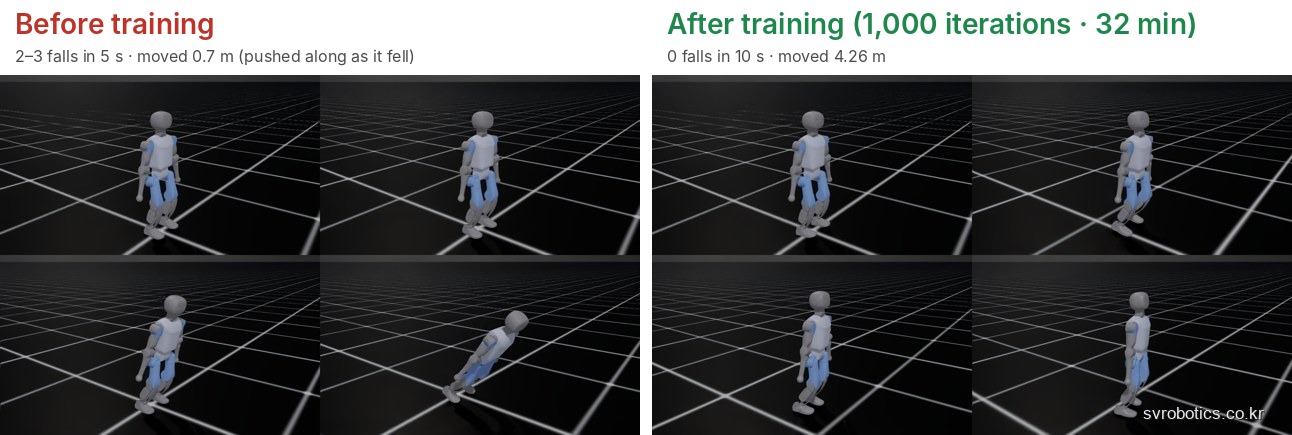
| Before training | After first training (v1) (1,000 iterations, 32 min) | |
|---|---|---|
| Falls | 2 to 3 in 5 seconds | 0 in 10 seconds |
| Distance moved | 0.7m (pushed along as it fell) | 4.26m |
| Mean reward | -0.28 | 32.0 |
We compared them under the same condition (a command of 0.5m/s forward).
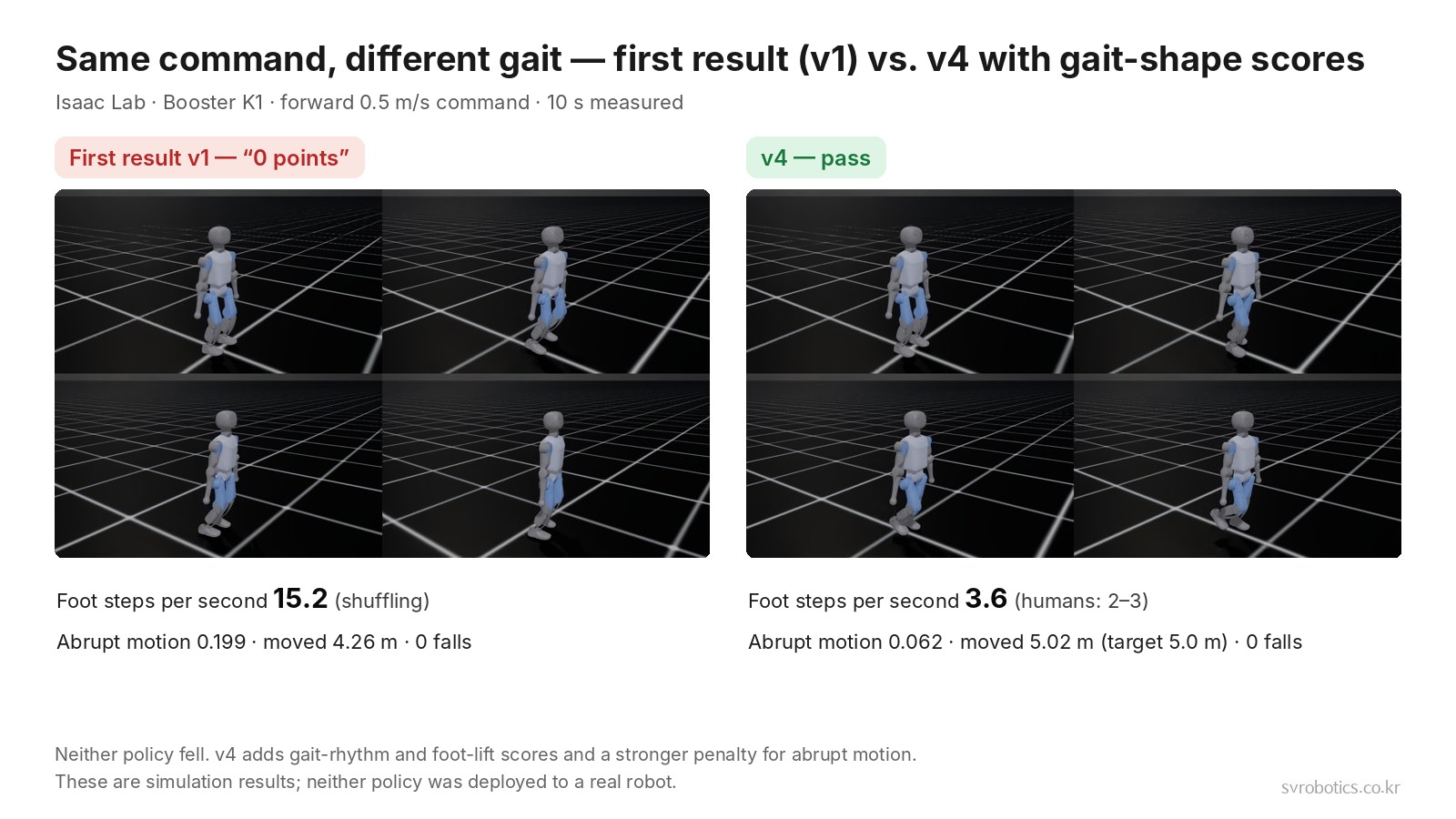
The robot no longer fell, but the gait shape did not pass. v4, which scores gait shape, gave the following on the same PC (the process is covered in Part 1 of the series).
| First result v1 | v4 (reference policy) | |
|---|---|---|
| Training | 4,096 robots, 1,000 iterations, about 32 min | 4,096 robots, 2,500 iterations, about 1 h 40 min |
| Foot steps per second | 15.2 (shuffling) | 3.6 (humans take 2 to 3) |
| Distance in 10 seconds (target 5.0m) | 4.26m | 5.02m |
| Falls | 0 | 0 |
What tools did we use, and do you have to buy anything?
We downloaded and used publicly available tools and models.
| Tool | Role | License |
|---|---|---|
| NVIDIA Isaac Sim 5.1.0 | Physics simulator | NVIDIA license (terms must be accepted) |
| Isaac Lab 2.3.2 | Reinforcement learning framework | BSD-3-Clause |
| MuJoCo 3.13.0 | Cross-check in another simulator | Apache-2.0 |
| Booster K1 model (URDF, MJCF) | Robot description files | BSD-3-Clause |
You can start without buying software, but you should allow plenty of storage. Isaac Sim is a 7.9GB download that unpacks to about 15GB, and the official installation adds another 3.3GB of training components. The places where the Windows installation got stuck are covered in a separate article.
Does the trained AI also walk in another simulator?
It does. The reference policy v4 did not fall in MuJoCo for forward, turning or sideways walking, and its heading drift while walking sideways shrank to -11.6°. We trained three times to get there: v1, v2 and v4.
We moved the trained result to MuJoCo, which has a different physics engine (using the K1 model that Booster officially provides), and tested each command for 10 seconds. In the first run (v1) the sideways walk fell, so we trained once more at the same scale (4,096 robots, 1,000 iterations) while randomizing floor friction, pushes and torso mass (v2).
| Command (10 s) → MuJoCo | First training (v1) | Randomized training (v2) | Gait shape score (v4) |
|---|---|---|---|
| Forward 0.5m/s | 0 falls, 4.84m | 0 falls, 3.68m (heading off by 35°) | 0 falls, 4.16m (heading 9.9°) |
| Walking forward while turning (target 458°) | 0 falls | 0 falls, 544° (turned more) | 0 falls, 470° |
| Sideways 0.3m/s | Fell at 1.7 s | 0 falls, 1.31m, body turned 195° | 0 falls, 2.00m (heading -11.6°) |
The sideways walk of v1 did not fall inside Isaac Lab. This difference comes from each simulator calculating physics differently, which is why we check in several simulators before going to a real robot. With v2 the robot no longer fell in MuJoCo, but it could not hold the commanded sideways direction and its body turned. For students, that makes a good discussion topic.
v4 adds, on top of the randomization in v2, a score for lifting the feet alternately in time with the gait rhythm. It is natural to read this as a rhythmic gait being less shaky when the engine changes, but we did not run a test that separates the causes. Mean reward is not compared between versions, because the scoring terms differ in each.
How can a lab split the work?
Training can run on a GPU PC, and checking can run on a lightweight simulator.
- Training: a workstation with a GPU. In this record, about 32 minutes for v1 and about 1 hour 40 minutes (2,500 iterations) for the reference policy v4
- Checking and observation: MuJoCo installs with one
pipline (about 0.16GB), and a one-robot simulation ran 30 to 45 times faster than real time on a CPU. It suits practice sessions where students take a trained result and run it
How to divide work between student laptops and a workstation is covered in Humanoid Teaching Lab: How to Think About Student Numbers and Equipment.
What else is needed to use it on a real robot?
Real-robot deployment, other GPUs, and the remaining error in sideways heading.
- The results were confirmed only in flat-ground simulation
- The force that pulls the joints (PD gains) is our own estimate, not a manufacturer-official value
- The sideways heading drift shrank to -11.6° in MuJoCo with v4, but it is not zero (-27° inside Isaac Lab)
- To put it on a real robot, you need to train more robustly and add a step that verifies the difference between simulation and the real world
Frequently asked questions
Can a lab without a GPU not do walking training?
Training that runs thousands of robots at once, as we did here, needs a GPU. Taking a finished result and running it in MuJoCo can be done on a CPU.
Does it not work on anything lower than this PC's specs?
We did not test other GPUs. This training used about 4.9GB of GPU memory.
Can the trained AI be used on a real K1 right away?
We have not confirmed this yet. These are flat-ground simulation results, and real-robot use needs additional training and verification.
Can this practice be run as a course?
We review with you the training PC setup, installation guidance, and how students check results, fitted to your institution's environment.
Next step
How to split work between a training workstation and student laptops differs by institution. After you look at the course outline, tell us the specs of the PCs you use now, and we will point out what else you need.
Versions used: Isaac Sim 5.1.0 · Isaac Lab 2.3.2 · MuJoCo 3.13.0 · booster_assets commit 3c2dfa9
Source: Values we trained and measured ourselves on the PC above (including v1 and v4). Reference: Isaac Lab user guide.
The copyright of this article and its figures belongs to SV Robotics. Quotations that credit a link to the original are welcome; reproducing or redistributing the full text, or reposting it as teaching material, requires permission.