
What Should You Check Before Adopting Lab Automation Equipment?
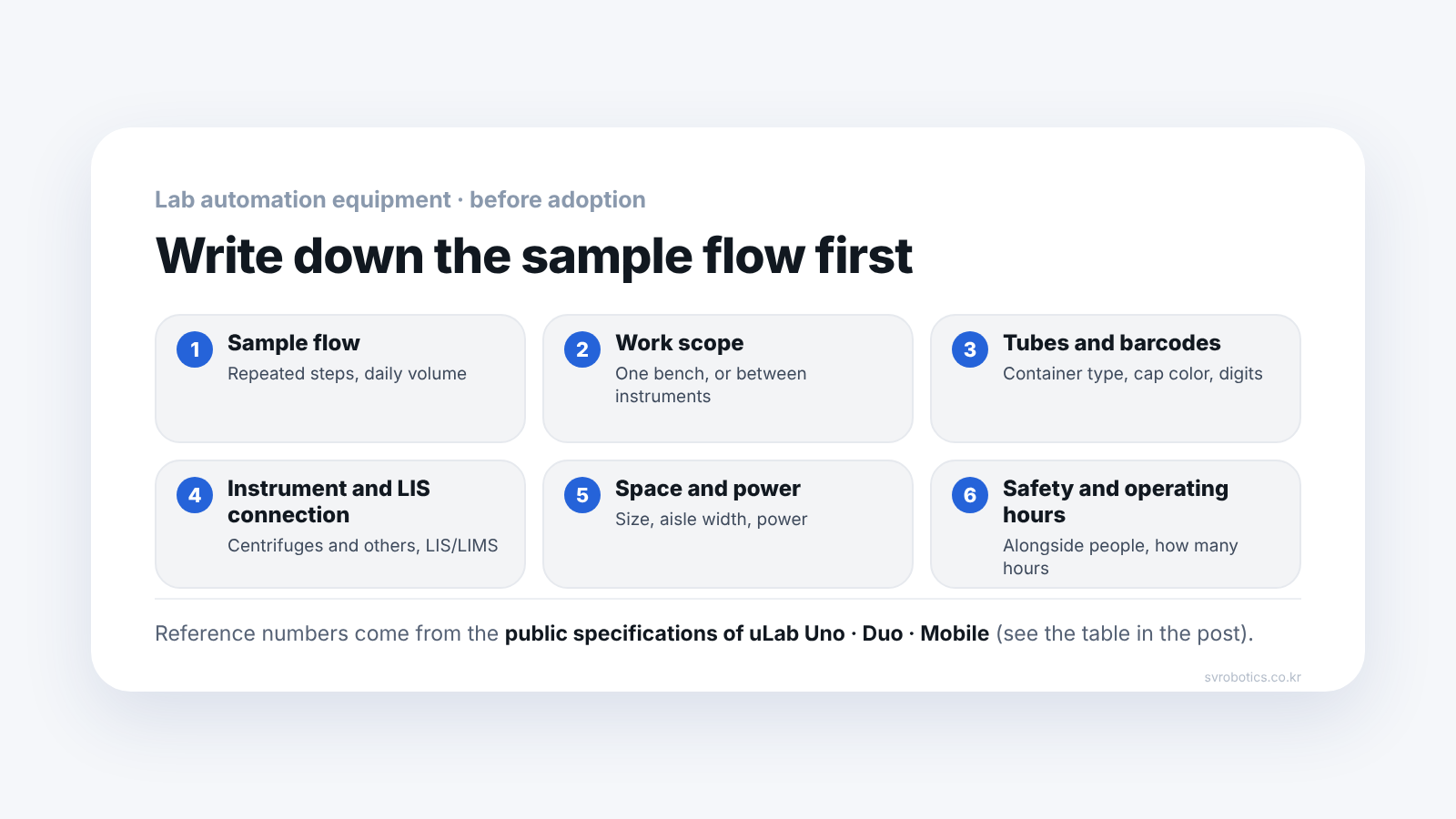
Before choosing a robot, write down how samples flow today. Then check, in order, whether the work repeats at one bench or moves between instruments, tube types and barcodes, the instruments and LIS/LIMS to connect, installation space and power, safety for working alongside people, and operating hours. The public specifications of uLab Uno, Duo and Mobile serve as reference numbers.
Before choosing a robot, write down how samples flow today. Once you know which step people repeat, and whether that work ends within one bench or has to move between instruments, the type of equipment follows.
This post is about equipment that automates with robots the lab work people used to repeat, such as sample handling. The reference numbers are the public specifications of uLab Uno, Duo and Mobile from United Robotics Group (URG), which we supply.
1. How do samples flow today?
The starting point is writing the repeated work down in order. The manufacturer also says adoption starts with "first checking the current work sequence and the existing instrument environment."
Write down the following.
- The work sequence from when a sample comes in until it goes out
- What people repeat: taking tubes from racks, reading barcodes, loading and unloading centrifuges, opening caps, putting samples in and retrieving them from cold storage, and so on
- Daily throughput and the busy hours
- Whether any work has to run at night or on weekends
The manufacturer's guidance is to automate the step with the most repetition first and expand from there, rather than changing everything at once.
2. Is it work at one spot, or movement between instruments?
The work scope decides the type of equipment.
| Work scope | Reference equipment | Public specification summary |
|---|---|---|
| Repetition at one bench or around one instrument | uLab Uno (single robot arm) | Up to 90 tubes/h |
| Steps that need two hands (hold and open, pick and sort at once) | uLab Duo (two collaborative robot arms) | Up to 170 tubes/h (continuous operation basis) |
| Moving between several work points and instruments | uLab Mobile (autonomous mobile manipulator) | Instrument loading, decapping, cold storage retrieval, rack transfer |
Throughput is a maximum, and actual throughput depends on test conditions and how samples are run. The manufacturer also publishes cases operating at hospitals and testing centers overseas.
A single arm sometimes has to put a tube down in the middle for the next step, while with two arms one arm takes over while the other holds, which removes that step. If samples have to move between instruments, look at the mobile type.
3. Do the tubes and barcodes match?
Check that the container is one the robot can pick up and read.
- Tube standard. The public specification for uLab Uno and Duo covers specimen containers conforming to EN 14820 / ISO 6710
- Barcodes. It reads barcodes of 8 to 20 digits
- Cap color recognition. It distinguishes cap colors with AI, and the published recognition rate is 95% or higher
If you write down the tube types you use now, your cap color rules and your barcode length, we can judge quickly whether it applies.
4. What instruments and systems do you connect?
Write down the list of instruments to connect and your laboratory information system.
- Connected instruments. Cases connecting to centrifuges, decapping instruments, specimen transport systems, scales, and hematology, coagulation and urinalysis instruments are published
- LIS integration (Uno and Duo). CLSI LIS1-A (formerly ASTM E1381) and REST API are supported. SiLA is in preparation, and OPC UA is applied project by project
- If there is no LIS. In the work management software uGo+, sample routes can be set by barcode suffix, cap color, or criteria the user defines
- LIMS and instrument connection (Mobile). LIMS and instruments connect through the open interface of uGo+, and URG describes Open SDK, API, REST and MQTT integration
5. Are the space and power adequate?
Measure the size, aisle width, and power and network.
| Item | uLab Uno and Duo | uLab Mobile |
|---|---|---|
| Body size | 160 × 58 × 60.5 cm | 800 × 580 × 1,905 mm |
| Weight | 100 kg | About 130 kg (depends on configuration) |
| Movement conditions | n/a | Minimum aisle width 900 mm, ground clearance 25 to 28 mm |
| Work range | Working radius 800 mm, maximum payload 5 kg | Maximum working height 2,000 mm |
| Power and network | 10 × 230V / 16A · 7 ports (as written in the public specification) | Battery about 5 to 6 hours |
The power figures are as written in the manufacturer's public specification.
The manufacturer says it installs into existing environments without major structural changes, but for Mobile you first need to measure route conditions such as aisle width and thresholds.
6. What about safety for working with people, and operating hours?
Look at whether people work in the same space, and for how many hours it will run.
- Safety (Uno and Duo). Certified safety zone and 17 configurable safety functions, safety performance Performance Level PLd, Category 3
- Safety (Mobile). It detects people and obstacles and adjusts its speed while moving. The manufacturer's technical material states conformity relating to CE (Machinery Directive 2006/42/EC), ISO 3691-4 and ISO 13482
- Operating hours (Uno and Duo). Up to 16 hours of autonomous operation according to the configured flow, switching from autonomous to manual operation within 10 minutes
- Operating hours (Mobile). Battery about 5 to 6 hours, and the manufacturer says a 24-hour configuration is possible by combining opportunity charging during work
- Data. It can run without a constant internet connection, and work history can be checked in uGo+
What should you tell us when you inquire?
- Your current sample processing flow
- The list of instruments you want to connect
- Daily throughput
- The repeated work you want to automate
- The size of the installation space and the aisle width
Based on this, we will review together which equipment can be applied where. Prices depend on lab conditions, so we give them as a separate quote.
Frequently asked questions
Do I have to replace the instruments I use now?
The manufacturer's approach is to use existing instruments and work flows and connect the steps you need first. We first check the list of instruments to connect.
Can a lab without a LIS use it?
With uLab Uno and Duo, even without a LIS, sample routes can be set in uGo+ by barcode suffix, cap color or user-defined criteria.
Does throughput match the specification?
The published throughput is a maximum. Actual throughput depends on test conditions and how samples are run, so we review it against your current flow.
How do I choose between a single arm and two arms?
For repeated moves in one step, look at the single arm first. For a step that needs two motions at once, such as holding and opening, look at two arms first.
Next step
Send us the repeated work and the installation space you wrote down in the checklist, and we will review which equipment fits. Prices depend on lab conditions, so we give them as a separate quote.
Sources: Official material for United Robotics Group uLab Uno, Duo and Mobile and SV Robotics product pages (updated 2026-08-31, checked 2026-09-18). Throughput is a maximum and varies with actual conditions. No prices are given.