
What Should You Check on Site Before Adopting a Cleaning Robot?
Floor material, the narrowest aisle and dead ends, the area and time for one run, charging and water fill-and-drain spots, and cleaning hours and noise. This post uses the public specifications of the LionsBot R3 Scrub Pro and R5 as reference numbers and explains what to measure.
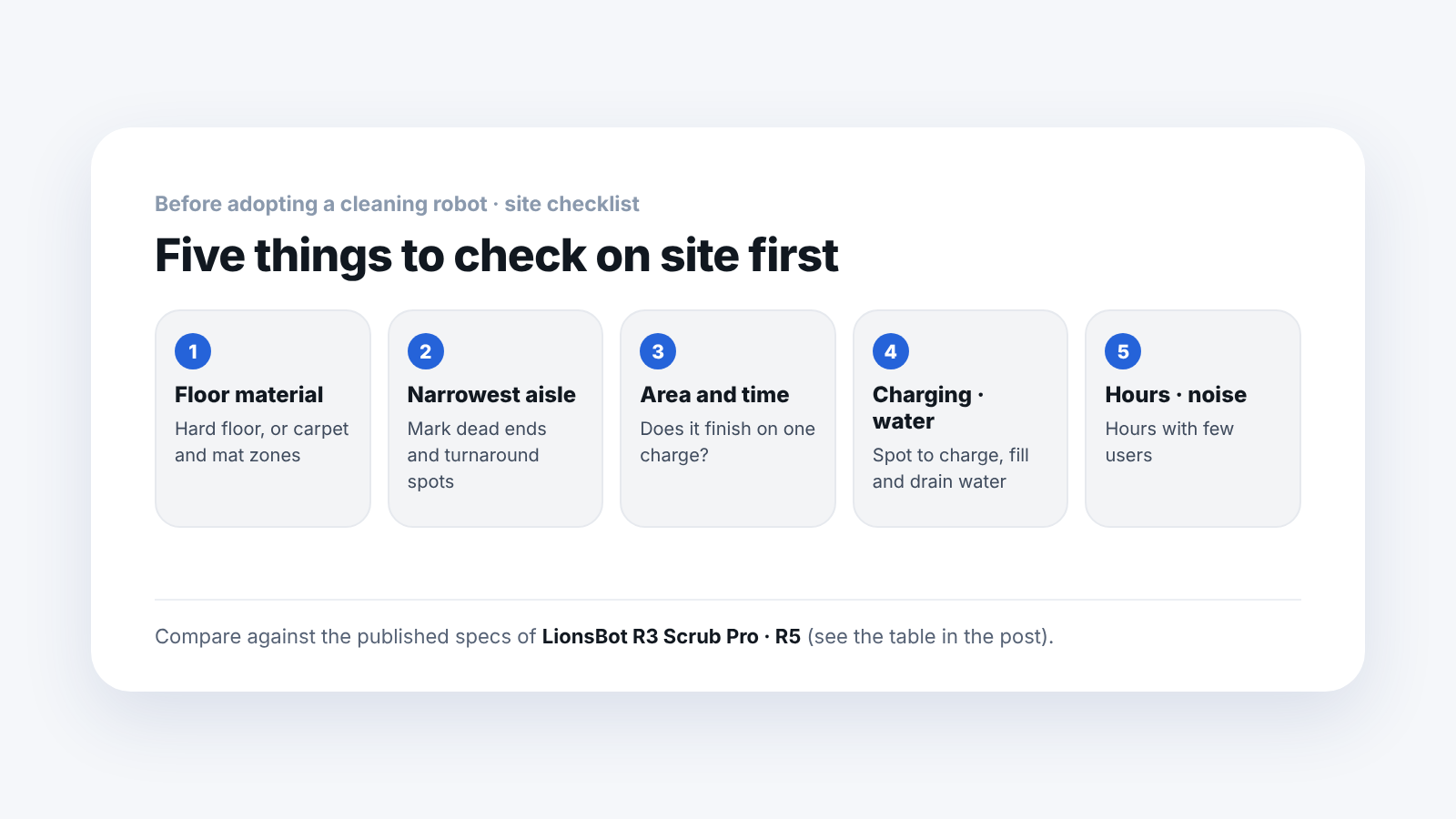
Floor material, the narrowest aisle, the area and time for one run, the charging and water fill-and-drain spots, and cleaning hours and noise. These are the five things to check on site first. The numbers on the spec sheet only become meaningful when you compare them with these measured values.
The reference numbers below are the official specifications of the LionsBot autonomous scrubbers we supply, the R3 Scrub Pro (a small body) and the R5 (for wide common areas), based on our product pages and the official LionsBot pages.
1. What is the floor material?
First, check whether the floor is hard. The floor type in the official R5 specifications is hard flooring. Carpeted areas are planned separately from the robot's cleaning areas.
What to write down on site:
- Floor material for each zone (tile, stone, coated floor and so on)
- Places with carpet or mats
- Locations of thresholds and slopes
2. Where are the narrowest aisles and dead ends?
Measure the narrowest spot with a tape measure, and mark the places where it has to turn.
| Reference number | R3 Scrub Pro | R5 |
|---|---|---|
| Size | 635 × 570 × 828mm | 690 × 690 × 1,125mm |
| Weight | 85.5kg | 200kg |
| Turning | — | 360° rotation in place |
The R3 Scrub Pro, with a body width of 570mm, lists narrow corridors and aisles as its main sites. The R5 has a larger body but is designed to rotate 360° in place, so at a dead end it changes direction without reversing.
On site, mark on the floor plan the places where it has to turn back out, such as between shelves and columns, dead-end corridors and the front of restrooms. If the 200kg R5 will move between floors, also check the elevator load capacity with building management.
3. How much area and time for one run?
List the area to be cleaned by zone, and check whether it can be finished on one charge.
| Reference number | R3 Scrub Pro | R5 |
|---|---|---|
| Maximum run time | Up to 3 hours | Up to 4 hours 20 minutes |
| Cleaning efficiency | Average practical 800–1,200㎡/h | Average 1,300㎡/h |
| Maximum coverage per charge | — | 5,000㎡ |
| Charging time | Average 2 hours | 3.5 hours |
| Cleaning width | 366mm (682mm with side brush) | 520mm |
The numbers on the spec sheet are maximum or average values. With many obstacles or when people are passing through, the area actually cleaned goes down. If a zone goes beyond one charge, you need a plan that fits charging time in and splits the work into rounds.
4. Where do charging and water fill-and-drain happen?
Decide where the charger goes and where water is filled and emptied.
- Tank capacity — R3 Scrub Pro: clean water 21L, dirty water 24L. R5: clean water 50L, dirty water 40L
- Automatic fill-and-drain station (optional) — The R3 Scrub Pro can automate charging, water filling and draining with the optional Automatic Refuel Station
If people fill and empty the tanks, how far that spot is from the cleaning area sets the daily working route. If you use an automatic station, you need a spot that power and water supply and drain piping can reach.
5. When will it clean, and how loud is it?
Choose a time when few people are around, and check the foot traffic at that time.
Average noise is 71dB for the R3 Scrub Pro and 70dB for the R5. First consider running it when few users are present, such as early morning before opening or after closing. Also note how many people pass through the cleaning area at that time.
How do you record what you checked?
Writing it next to your current equipment speeds up the consultation.
| Item | Current equipment and site | What to record |
|---|---|---|
| Cleaning area | (record) | ㎡ for each zone |
| Narrowest aisle | (record) | mm |
| Daily working hours | (record) | Start and end times |
| Scrubber in use now | (record) | Cleaning width, tank capacity |
| Number of workers | (record) | Headcount for each shift |
Frequently asked questions
Does it stop when there is an obstacle?
The R5 is designed so that AI NavSense detects the obstacle, finds a route around it, and returns to the job. The R3 Scrub Pro uses AI SmartClean for route planning, real-time obstacle response and self-recovery.
Which should I look at if I have many narrow aisles?
With many narrow corridors and aisles, look first at the R3 Scrub Pro, which has the smaller body. If you need to clean a wide common area for a long stretch at once, look at the R5.
Can I use several together?
The R3 Scrub Pro can control several robots and manage schedules in the mobile app, and for the R5 a multi-robot operation function that divides zones so that jobs do not overlap is listed.
What should I tell you in the consultation?
If you tell us the specifications of the scrubber you use now, the cleaning area, the aisle width, the daily working hours and the number of workers, we will review suitability and the way of operating.
Next step
Once you have measured the five items, it is time to narrow down the model. Tell us the narrowest aisle width, the floor material and the daily working hours, and we will point out which one fits. The price is given as a separate quote that fits site conditions.
Sources: Official LionsBot R5 and R3 Scrub Pro product pages and SV Robotics product pages (checked 2026-09-17). Actual cleaning area and time vary with site conditions, and no prices are given.