
Giving a Simulated Robot Eyes and a Sense of Balance — Mounting a Lidar and an IMU and Checking They Are Attached Correctly
We mounted a lidar and an IMU on the educational AMR robot arm standing in the virtual world. We put walls on all four sides and checked whether the lidar points land on the walls. Read the scan in the opposite direction and only 42.8% match. The IMU stayed at 0 because of one thing, the order in which it was created. We also describe how we handled a lidar whose real specification we could not obtain.
Mounting a sensor and mounting it correctly turned out to be different things. We put walls on all four sides of the simulated robot and checked whether the lidar points landed on them. Reading the scan in one direction, 99.9% of the points landed on the walls. Reading it in the opposite direction, only 42.8% did. For the IMU, the values moved away from 0 once we changed the order in which it was created.
In part 1 of the series, "The Day the Robot Flew into the Sky", we stood the educational AMR robot arm up in the NVIDIA Isaac Sim virtual world. This part covers mounting a lidar (a sensor that measures distances around the robot) and an IMU (an inertial measurement unit that measures tilt, rotation and acceleration) on that robot, and checking that they were attached correctly. At this stage we did not move the robot. We checked only while it stood still.
Why do a lidar and an IMU matter?
The lidar works as the robot's eyes. It fires a laser in a full rotation and measures the distance in each direction from the return time. It is used to avoid obstacles and to build maps.
The IMU is the robot's sense of balance. It measures how far the robot is tilted, how fast it is turning, and in which direction it is being pushed.
To do reinforcement learning with a simulated robot, the simulated robot has to see the world from the same place and in the same way as the physical robot. If a sensor sits in the wrong place or its values are read backwards, what is learned in simulation does not work on the physical robot.
Which lidar did we mount?
We read the mounting position and orientation as written in the robot's design file and attached the sensors accordingly. The lidar was mounted on top of the chassis rotated 180° so that it faces backward.
The problem was the lidar's real specification. We confirmed the model name of the lidar on the robot, but we could not find a datasheet with its measuring range, rotation rate and number of points per revolution, either on the web or on the physical label. The label carried only a serial number.
So we used the public specification of a similar 2D rotating lidar product as a stand-in.
| Item | Value used for the simulated lidar | Nature |
|---|---|---|
| Rotation rate | 10 revolutions per second | Stand-in value — not the specification of the lidar on the real robot |
| Measuring range | 0.05 to 30 m | Stand-in value |
| Beams per revolution | 3,200 | Stand-in value |
These values are not the specification of the lidar on the real robot. We noted in our records that they are values to replace once we obtain the datasheet.
How did we check that the lidar was attached correctly?
We built a world where we know the answer, and measured inside it. We put four walls around the simulated robot.
| Wall | Distance from the robot |
|---|---|
| Front | 0.95 m |
| Back | 1.95 m |
| Left | 1.45 m |
| Right | 0.65 m |
Because we know where the walls are, if the lidar is attached correctly the recorded points should lie on the wall surfaces.
The results are as follows.
- Of the 3,200 beams in one revolution, 2,221 hit a wall and returned a value. The other 979 pointed in directions where no wall was reached and returned no value.
- Of the 2,221 returned values, 2,219 (99.9%) landed within ±3 cm of a wall surface.
- The shortest measured distance was 0.642 m, which matches the nearest wall, the right wall (0.65 m).
This 99.9% means that "the simulated lidar's points landed in the right place on four walls whose positions we know." It does not mean that a physical lidar is that accurate.
Why did one scan direction split the result into 99.9% and 42.8%?
What the lidar sends is a list of the form "beam number N is at M meters." Which direction beam number N points in depends on which way you walk through the list when reading it.
| Direction the list was read | Points within ±3 cm of a wall surface |
|---|---|
| Read counterclockwise | 99.9% |
| Read clockwise | 42.8% |
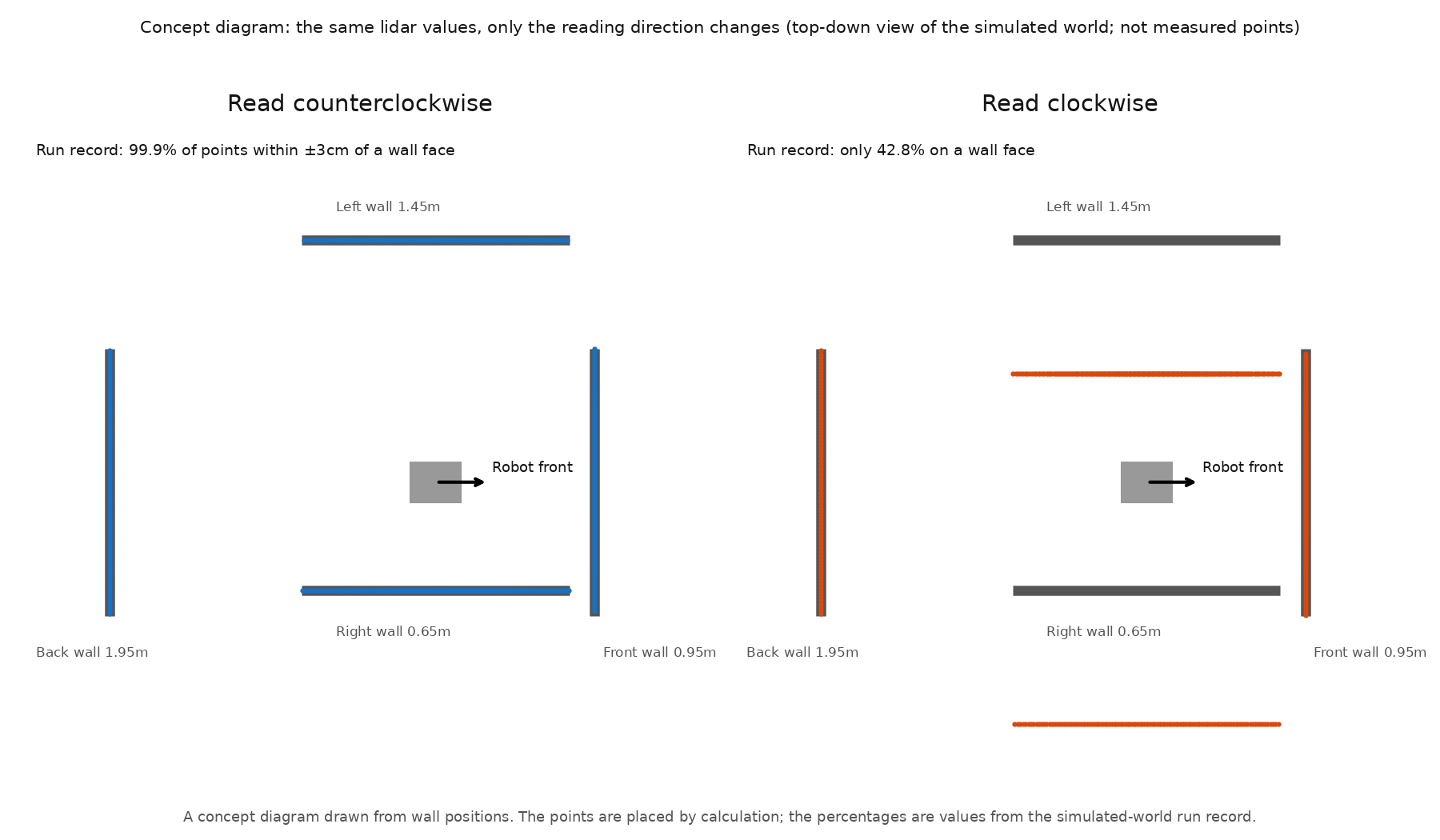
We only changed the direction in which the same data was read, and the result changed a great deal. Without the wall test we might have moved on to the next stage with the list read backwards. The robot would have trained believing that an obstacle on its left was on its right.
What else did we fix while mounting the lidar?
In part 1, to keep the robot from being thrown off, we turned on a setting that merges small fixed parts into the part directly above them. After this setting, the lidar's reference frame ended up outside the robot's body. If the reference frame does not follow the body, the lidar stays in place when the robot moves.
So we worked around it by creating the lidar directly under the chassis instead of relying on the reference frame in the design file. For the mounting position and orientation we used the values read from the design file as they were.
Why did the IMU values stay at 0?
After mounting the IMU and reading it, we got only 0. The cause was the order in which it was created.
- When the IMU was created after physics had started, the values stayed at 0.
- When it was created before physics started, values came out.
The lidar was different. The lidar worked even when it was created after physics had started. Even within the same virtual world, each sensor had its own rule about the order of creation.
How did we know the IMU values were correct?
When the robot stands still, the values the IMU should measure are known in advance. Along the vertical axis it should read the acceleration of gravity, the rotation should be close to 0, and the orientation should equal the mounting orientation in the design file.
These are the values read after 240 calculation steps with the robot standing still.
| Item | Value read | Correct? |
|---|---|---|
| Linear acceleration (x, y, z) | 0.114, −0.009, 9.810 m/s² | The vertical axis equals gravity (9.81) |
| Angular velocity (x, y, z) | −0.0016, 0.0038, 0.0046 rad/s | Close to 0 — at rest |
| Orientation | Rotated by about 90° | Equals the IMU mounting rotation in the design file (90°) |
All three were consistent with a robot standing still.
How did the lidar on the physical robot behave?
This part is about the simulated robot, but we also describe what happened with the physical lidar.
- Right after the physical robot was switched on, the lidar distance values came out empty (the value was 0 or not a number).
- After the robot had been on for a while, normal distance values came out, and map building and obstacle avoidance worked in that state.
- We have not yet determined how many minutes of waiting are needed, why it happens, or whether it happens every time. If we started after switching on and waiting long enough, normal values came out.
One test that tried to record the values right after power-on had all of its results invalidated. The cause was not the robot or the lidar but the way we ran the test program (it differed from the execution environment the robot requires). It was another reminder that the reason something fails may not lie with the robot.
What did we learn from this?
- Measure first in a world where you know the answer. Because we had four walls at known positions, we could judge with numbers whether the sensor was attached correctly.
- One reading direction can flip the result. The same data gave 99.9% when read counterclockwise and 42.8% when read clockwise.
- The creation order changes the values. The IMU had to be created before physics started.
- If there is no datasheet, use a stand-in, and write down that it is a stand-in. This is so that we do not forget the values that must be replaced later.
Frequently asked questions
Does the 99.9% for the simulated lidar mean a physical lidar is accurate?
No. It is the share of the simulated lidar's points that landed within ±3 cm of a wall surface, in a virtual world with four walls at known positions. It is a number for checking that the simulated lidar was attached correctly to the robot, and it is different from the accuracy of a physical lidar.
Are the simulated lidar's measuring range and rotation rate the same as on the real robot?
We could not confirm this. We could not obtain the datasheet of the lidar on the robot, so we used the public specification of a similar 2D lidar product as a stand-in. These are values to replace once the specification is confirmed.
If the simulated IMU values stay at 0, what should I look at first?
In our case the cause was the order in which the IMU was created. Created after physics had started, it stayed at 0, and created before physics started, values came out (confirmed in Isaac Sim 5.1.0). We have not checked whether the same holds in other versions.
Can I drive this simulated robot with these sensors right away?
In this article we checked only while the robot stood still. Sensor values while moving, sensor noise, and the connection to the robot's software were not tested at this stage.
Can this process be covered in a class?
The scope and method covered in classes are explained in the education consultation.
The values in this article were checked in Isaac Sim 5.1.0 with the robot standing still. For the simulated lidar we used the public specification of a similar product instead of the real specification, and we do not cover sensor values or noise while moving. The simulated robot is driven by giving the chassis a velocity directly rather than by turning the wheels, so the sideways slip of mecanum wheels is not reproduced (see part 1).
Next step
In the next part we build the practice arena where the simulated robot with these sensors will practice. We describe how we placed the obstacles and how we designed the way lidar values are passed to training. The method covered in classes is explained in the education consultation.
Version used: Isaac Sim 5.1.0
Sources: Our own sensor-mounting exercise on the educational AMR robot arm (2026-09-21) and our checks of the physical lidar (2026-08-22, 2026-08-24 and 2026-09-22). The simulated lidar's measuring range, rotation rate and beam count are not the specification of the lidar on the real robot but stand-in values taken from the public specification of a similar product.
The copyright of this article and its figures belongs to SV Robotics. Quotation with a link to the original is welcome. Reproducing the full text, redistributing it, or republishing it as teaching material requires permission.